A4p Bridge Yootheme Pro – Event Booking (System Plugin) – Docu Joomla

Installation Guide

Requirements

Before installing the plugin, make sure the following extensions are already installed on your Joomla website:

  • Joomla 5.x
  • YOOtheme Pro
  • Event Booking

Installation Steps

1. Download the Plugin

Download the plugin ZIP file:

plg_system_eventbookingyootheme_unzip_first.zip

Unzip the file.

2. Open Joomla Extension Installer
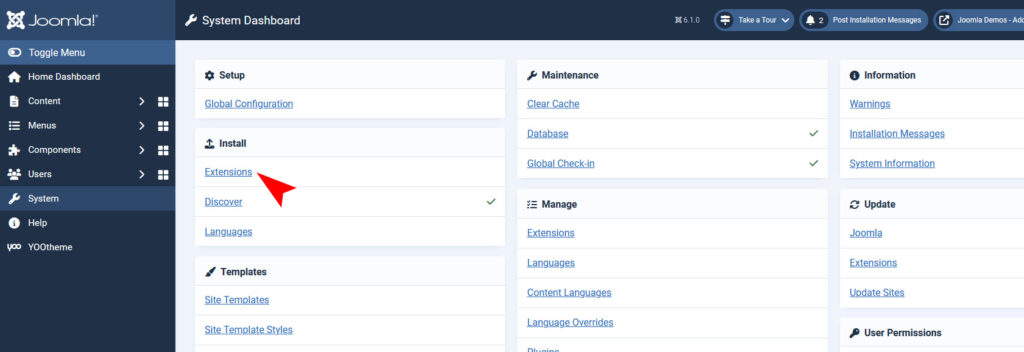
In the Joomla administrator backend, go to:

System → Install → Extensions

3. Upload the Plugin
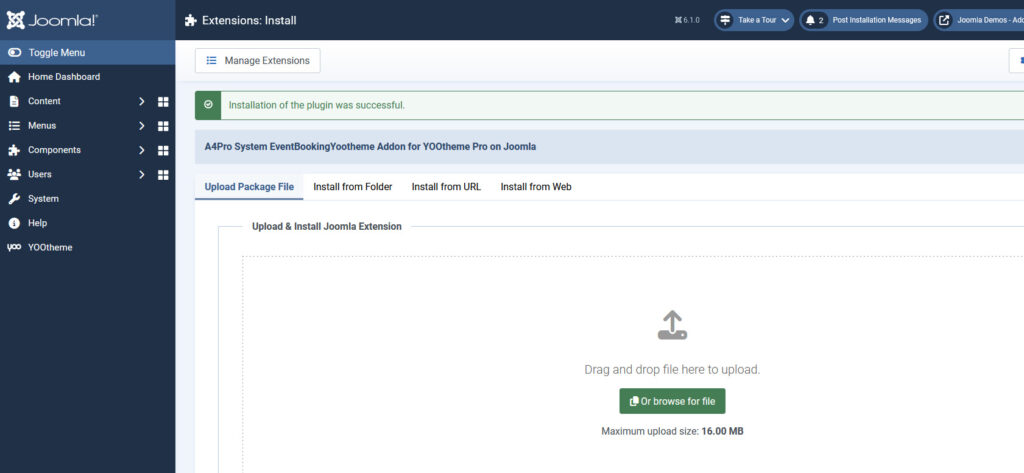
  • Select the plugin ZIP file.
  • Upload and install it.

Joomla will automatically install the plugin.

4. Enable the Plugin
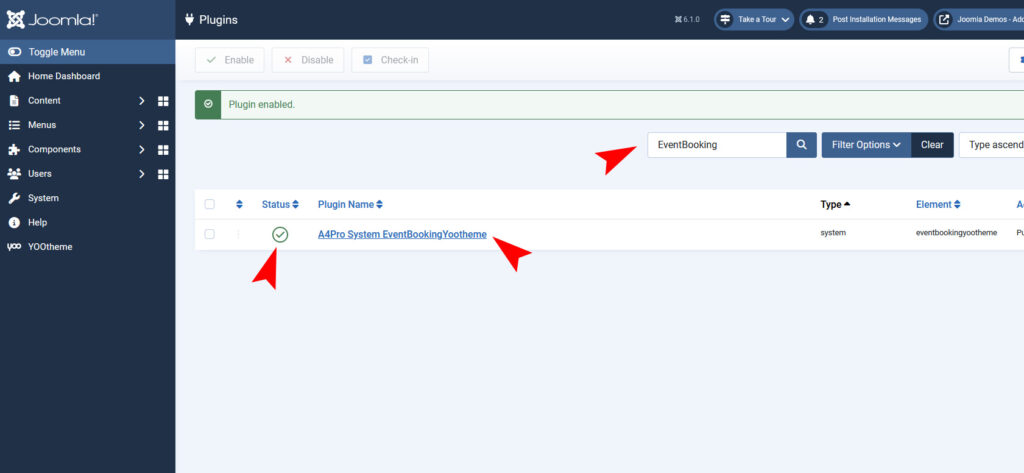
After installation, go to:

System → Plugins

Search for:

A4Pro System EventBookingYootheme

Enable the plugin if it is not already enabled.

Using the Plugin in YOOtheme Pro

After activation:

  1. Open YOOtheme Pro Builder.
  2. Add or edit an element.
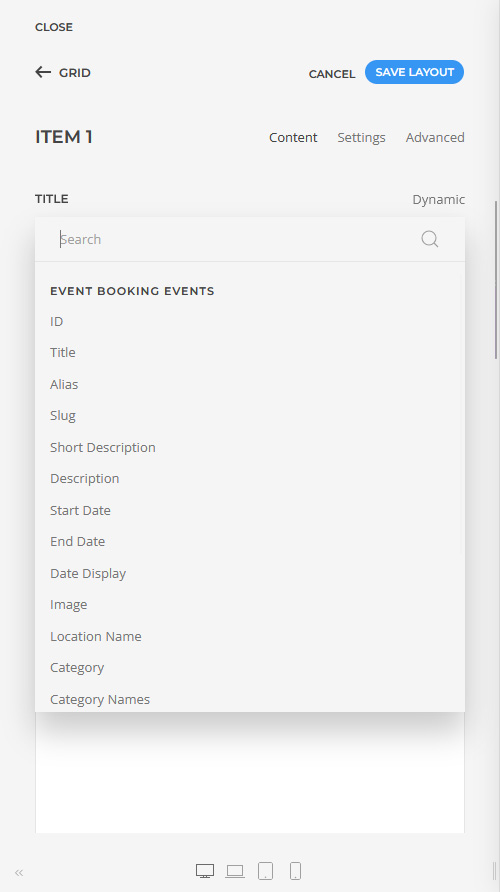
  3. Click on Dynamic Content.
  4. You will now find new Event Booking dynamic fields and sources.
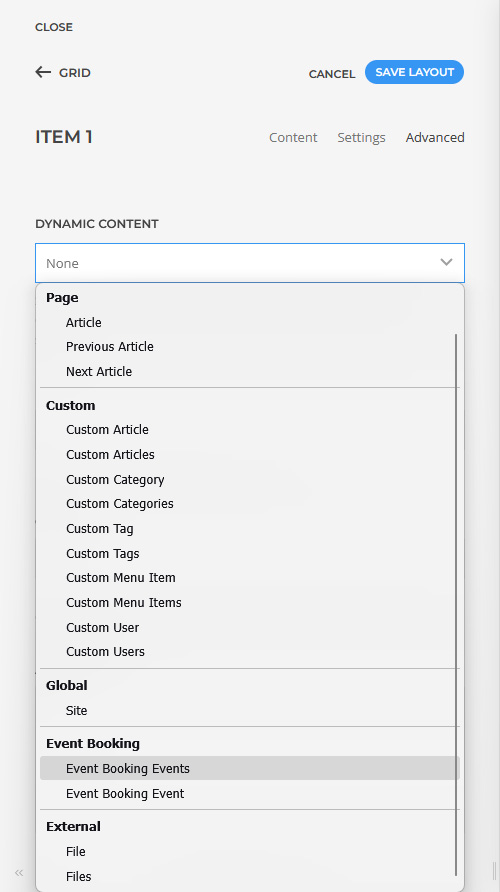
Examples:

  • Event Title
  • Event Date
  • Price Display
  • Capacity
  • Available Spaces
  • Event Categories

Notes

  • The plugin does not modify Event Booking itself.
  • All events are still managed inside Event Booking.
  • The plugin only extends YOOtheme Pro with dynamic Event Booking data.

Recommended

After installation, it is recommended to:

  • clear Joomla cache
  • clear YOOtheme Pro cache

This ensures all new dynamic sources are loaded correctly.

Changelog

Version 0.5.1

Added

  • Added dynamic field “Category”
  • Added dynamic field “Category Names”
  • Added dynamic field “Category IDs”

Improved

  • Improved compatibility with Joomla 5
  • Improved compatibility with YOOtheme Pro 5
  • Improved internal field normalization
  • Improved defensive handling for YOOtheme schema loading

Security

  • Reviewed database query handling
  • Reviewed field normalization and input handling
  • Reviewed Joomla database API usage
  • Reviewed plugin bootstrap behavior for backend stability

Changed

  • Unified branding to “A4Pro”
  • Updated plugin metadata and manifest information

Version 0.5.0

Added

  • Joomla 5 compatible plugin structure
  • YOOtheme Pro dynamic content source integration
  • Event Booking events as dynamic content source
  • Dynamic event query support
  • Dynamic field support for:
    • Title
    • Description
    • Short Description
    • Event Date
    • Event End Date
    • Cut Off Date
    • Image
    • Thumbnail
    • Price
    • Location
    • Featured State
    • Capacity
    • Registrations
    • Available Spaces
    • Date Display
    • Price Display
  • Event URL generation
  • Dynamic content length support for text fields
  • Multiple category filtering
  • Event Booking category select list
  • Featured events filtering
  • Upcoming events filtering
  • Event sorting support
  • German and English language support
  • A4Pro branding and metadata

Improved

  • Better compatibility with YOOtheme dynamic source schema
  • More defensive source registration handling
  • Better event field formatting
  • Better category tree rendering
  • Better handling for empty fields

Fixed

  • Fixed YOOtheme dynamic content dialog disappearing
  • Fixed Joomla backend lock caused by plugin bootstrap
  • Fixed category select rendering
  • Fixed event capacity field rendering
  • Fixed frontend rendering issues caused by invalid field mapping
  • Fixed event capacity database mapping
  • Fixed schema loading conflicts with YOOtheme

Version 0.4.8

Changed

  • Updated addon metadata
  • Updated author information
  • Updated branding information
  • Updated license information

Version 0.4.7

Added

  • Added Date Display field
  • Added Price Display field
  • Automatic Event Booking date formatting
  • Automatic Event Booking price formatting

Version 0.4.6

Added

  • Added Registrations field
  • Added Available Spaces field
  • Automatic calculation of remaining spaces

Version 0.4.5

Fixed

  • Fixed capacity database field mapping
  • Fixed frontend rendering when using capacity field

Version 0.4.4

Improved

  • Improved field type handling for capacity field
  • Improved rendering stability inside YOOtheme preview

Version 0.4.3

Added

  • Added dynamic field Capacity

Version 0.4.2

Added

  • Added YOOtheme content length support
  • Added preserve words support
  • Added text field formatting compatibility

Version 0.4.1

Fixed

  • Fixed category select rendering
  • Fixed category option formatting
  • Fixed category tree handling

Version 0.4.0

Added

  • Added real Event Booking category select list
  • Added category multi-select support
  • Added hierarchical category rendering

Version 0.3.0

Improved

  • Reworked YOOtheme source registration
  • Improved schema stability
  • Improved backend compatibility
  • Reduced schema conflicts

Version 0.2.1

Fixed

  • Fixed Joomla application container issue
  • Fixed plugin bootstrap compatibility

Version 0.2.0

Improved

  • Added Joomla 5 service provider structure
  • Added defensive plugin loading
  • Added safer YOOtheme bootstrap handling

Version 0.1.0

Initial Release

  • Initial Event Booking source integration for YOOtheme Pro
  • Initial dynamic content support
  • Initial event provider implementation
  • Initial GraphQL source implementation