J!UM – Joomla Update Manager
J!UM helps you centrally manage extension updates across multiple Joomla websites. Joomla handles its own Core updates – J!UM gives you the overview and tools you need for components, modules and plugins.

J!UM requires Joomla 6 and an active J!UM license.
Each website managed through J!UM must have the appropriate J!UM Connector (for Joomla 5 and Joomla 6 included) installed and configured. A secure HTTPS connection between J!UM and the connected website is required. Commercial extensions may require valid update credentials or download keys from their respective developers.
J!UM manages extension updates only. Joomla Core updates remain handled by Joomla’s native update functionality.



Product Overview
Central Joomla Management Made Simple
J!UM – Joomla Update Manager is a professional management solution for administrators, agencies and service providers who maintain multiple Joomla websites.
J!UM focuses specifically on Joomla extensions.
Joomla itself provides its own update mechanisms for the Joomla Core, including automatic update capabilities available in modern Joomla versions. J!UM does not replace this native Joomla functionality.
Instead, J!UM helps you centrally monitor and manage extension updates across your connected Joomla websites.
Connect your websites to J!UM and get a structured overview of installed extensions, available extension updates and relevant maintenance information.
This allows you to identify outdated extensions across multiple Joomla installations, find affected websites and organize recurring extension maintenance from one central management interface.
Joomla takes care of Joomla.
J!UM takes care of your extensions.
Joomla Updates Joomla – J!UM Updates Your Extensions
J!UM deliberately separates Joomla Core maintenance from extension maintenance.
Joomla already provides its own reliable update mechanisms for the Joomla Core. Since Joomla 5, Joomla also offers automatic Core update capabilities.
J!UM therefore does not attempt to replace Joomla’s native Core update system.
Instead, J!UM concentrates on third-party extensions – components, modules, plugins and other installed extensions that administrators need to monitor across their Joomla projects.
This clear separation avoids duplicated functionality and allows J!UM to focus on the area where agencies and administrators managing multiple websites often spend considerably more time: extension maintenance.
Manage Multiple Joomla Websites from One Dashboard
Managing several Joomla websites usually means repeatedly logging into different administrator areas, checking update notifications and keeping track of maintenance tasks manually.
J!UM replaces this fragmented workflow with a central Joomla management dashboard.
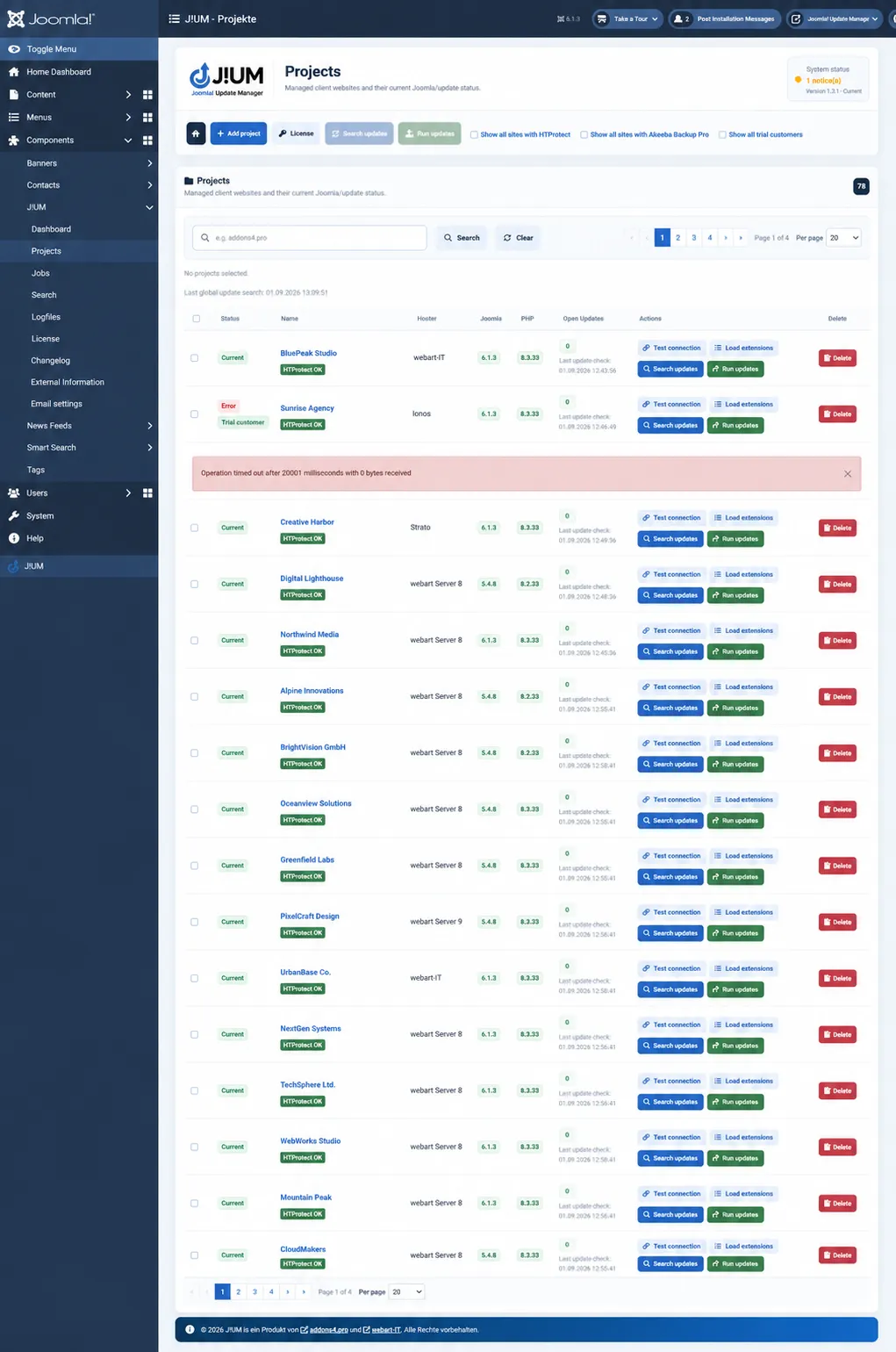
Connected Joomla websites are organized as projects and can be monitored from one interface. Important information is collected centrally so that administrators can quickly identify websites requiring attention.
This makes J!UM particularly useful for:
- Joomla agencies
- Freelancers and developers
- Web hosting and maintenance providers
- Companies managing multiple Joomla installations
- Administrators responsible for customer websites
- Professional Joomla support and maintenance workflows
Built for Joomla Agencies and Professional Administrators
J!UM was designed for real-world Joomla extension maintenance workflows.
When you manage customer websites professionally, the challenge is not updating the Joomla Core. Joomla already provides its own update mechanisms for this task.
The challenge is keeping track of the many third-party extensions installed across different customer websites.
- Which websites have pending extension updates?
- Which customers use a particular extension?
- Which installations may be affected by an important extension release?
- When was a website last checked?
- Which extensions require attention?
J!UM brings this information together and provides a central workspace for recurring Joomla extension maintenance.
Less switching between administrator areas.
More overview.
More structured extension maintenance.
Monitor Extension Updates Across Your Joomla Websites
J!UM focuses on one of the most time-consuming parts of maintaining multiple Joomla websites: keeping installed extensions up to date.
Instead of logging into every Joomla administrator area individually and checking components, modules and plugins one by one, J!UM collects extension and update information from your connected websites and brings it together centrally.
Joomla Core updates remain the responsibility of Joomla itself.
Modern Joomla versions provide their own Core update mechanisms, including automatic update capabilities. J!UM deliberately complements this functionality rather than duplicating it.
Manage Extension Updates Centrally
J!UM does more than simply report that updates are available.
Extension information from connected Joomla websites can be retrieved and displayed centrally. Available updates can then be reviewed and, where supported, initiated directly through J!UM.
This creates a controlled workflow for recurring Joomla maintenance and reduces the amount of manual work required when managing multiple installations.
Find Extensions Across All Your Joomla Projects
Need to know which websites are using a particular Joomla extension?
J!UM provides cross-project search and extension information that helps you identify installations across your managed websites.
This is particularly useful when an extension receives an important update or when you need to determine which customer projects are affected by a specific component, module or plugin.
Instead of checking websites individually, you can identify relevant projects centrally and prepare the required maintenance work efficiently.
Track Maintenance Jobs and Update Processes
Maintenance actions should remain transparent – especially when multiple websites are involved.
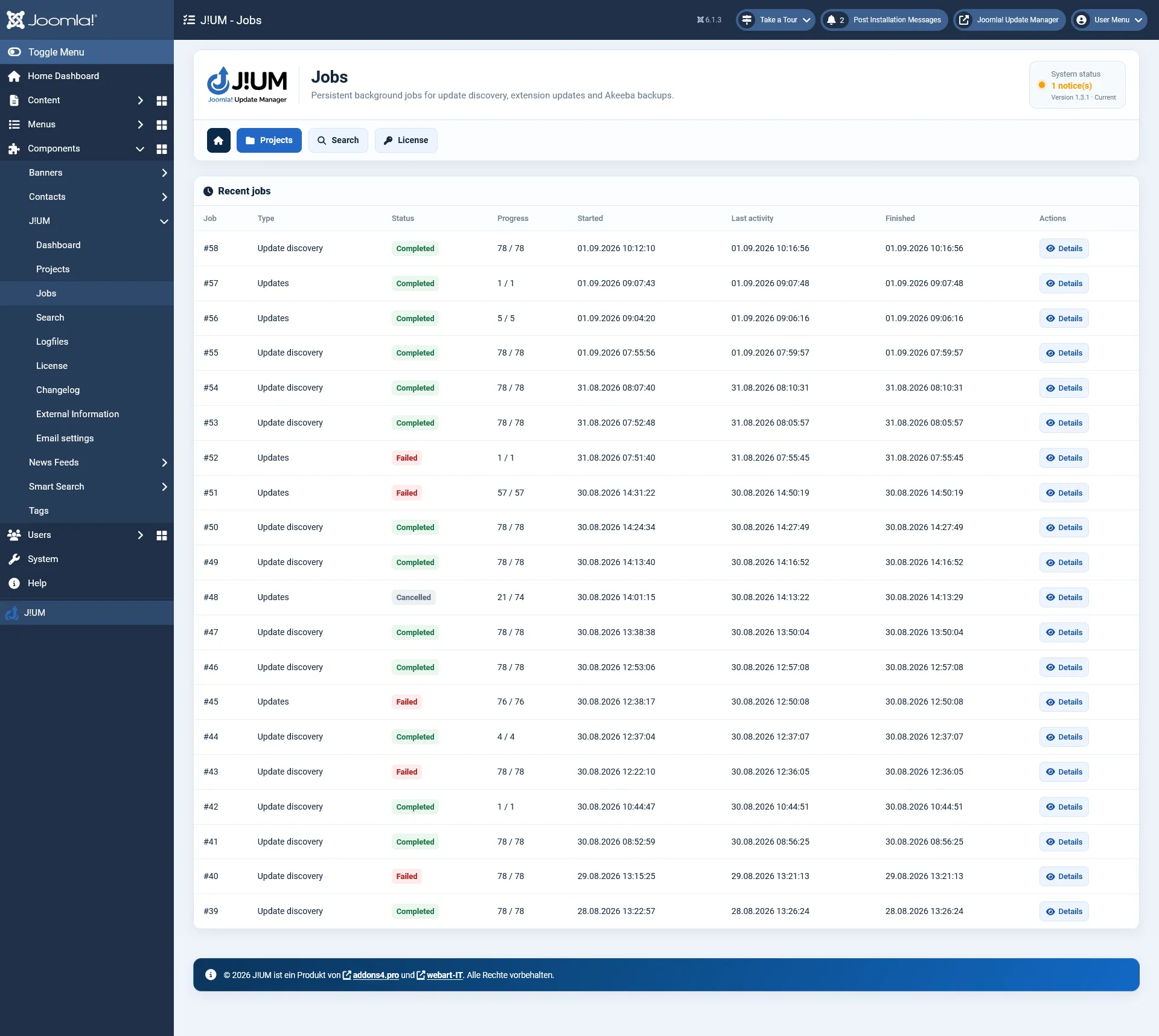
J!UM therefore tracks update and maintenance processes as jobs. Administrators can review the status of individual operations and see which steps are waiting, currently being processed or already completed.
This provides a clear operational history and makes it easier to understand what happened during a maintenance process.
Detailed Information for Every Joomla Website
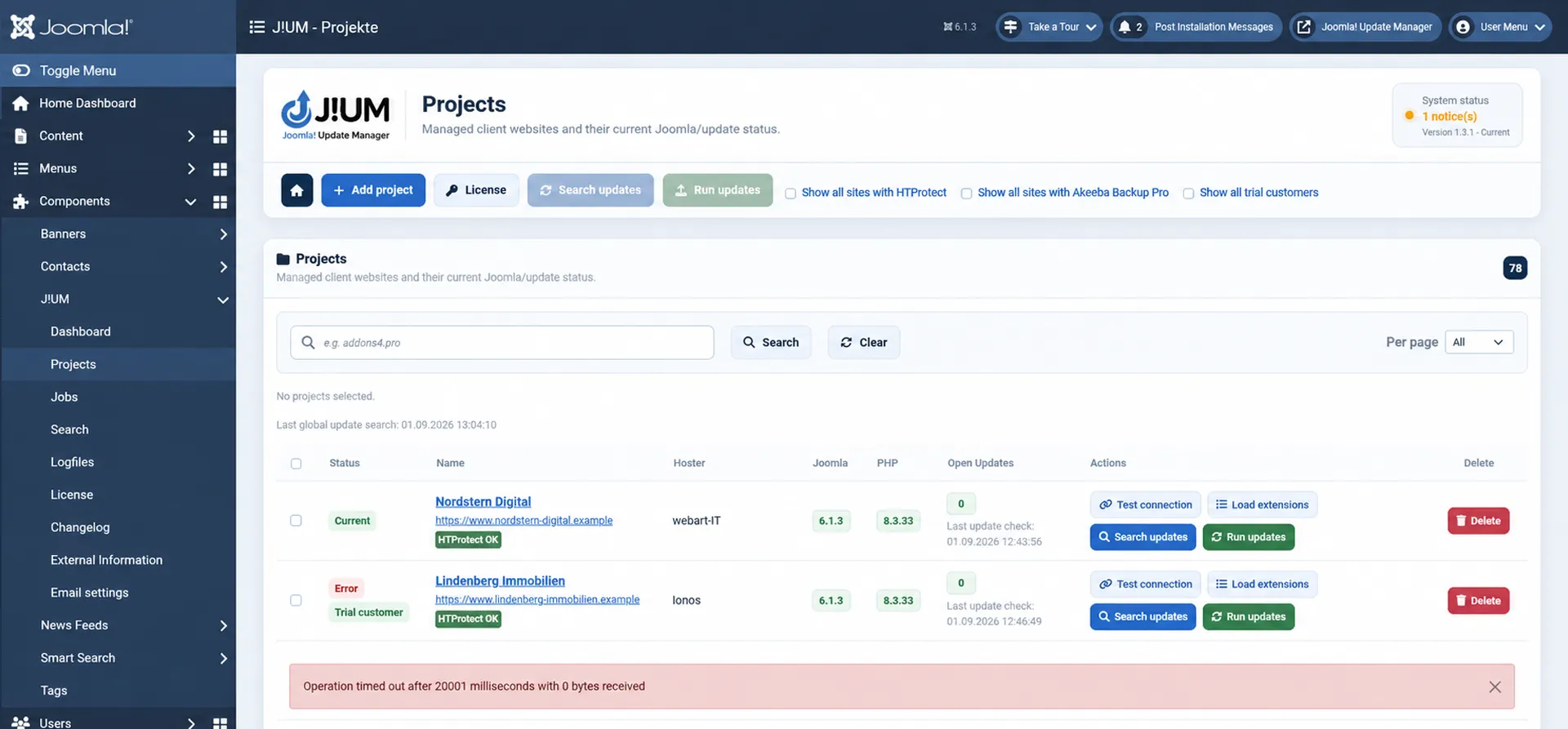
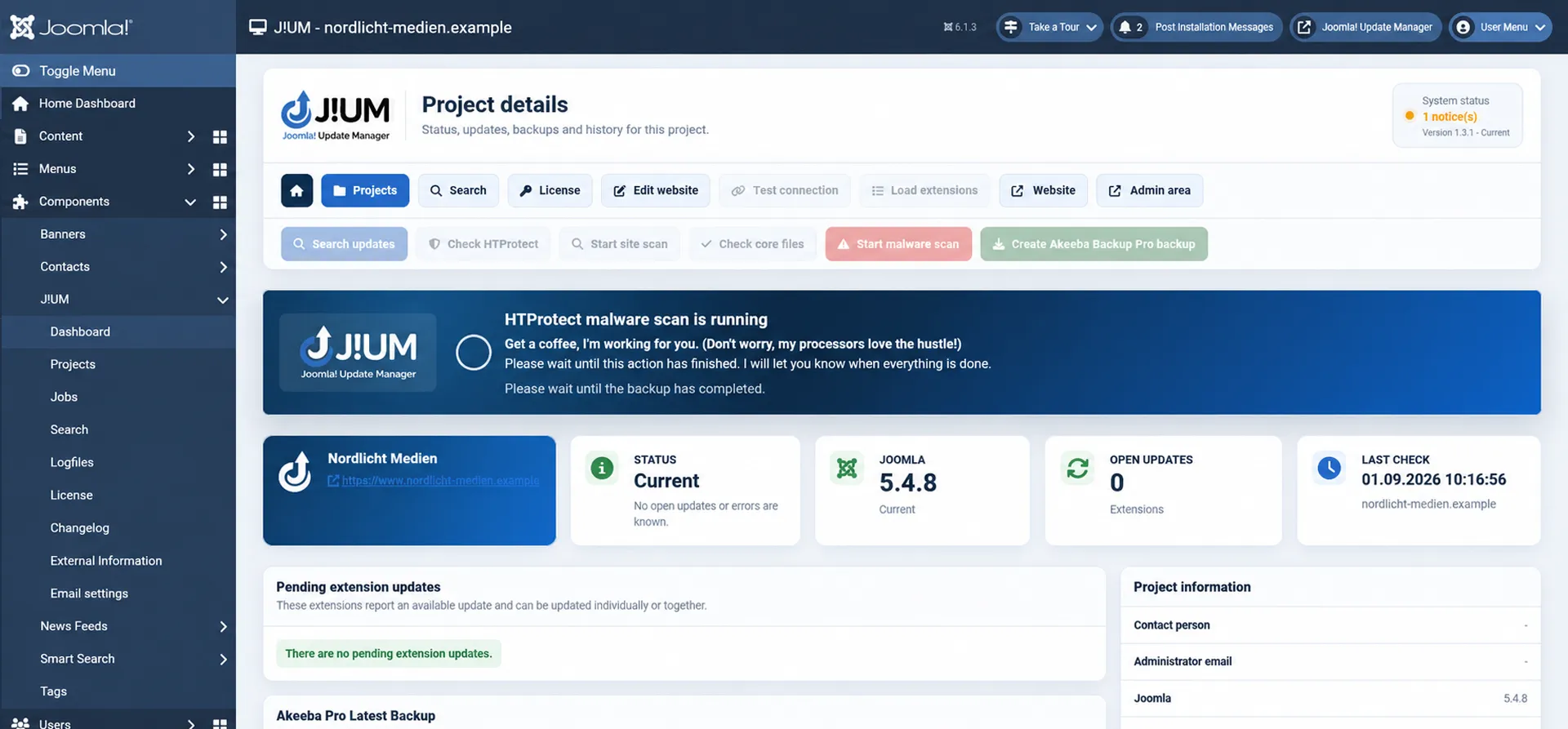
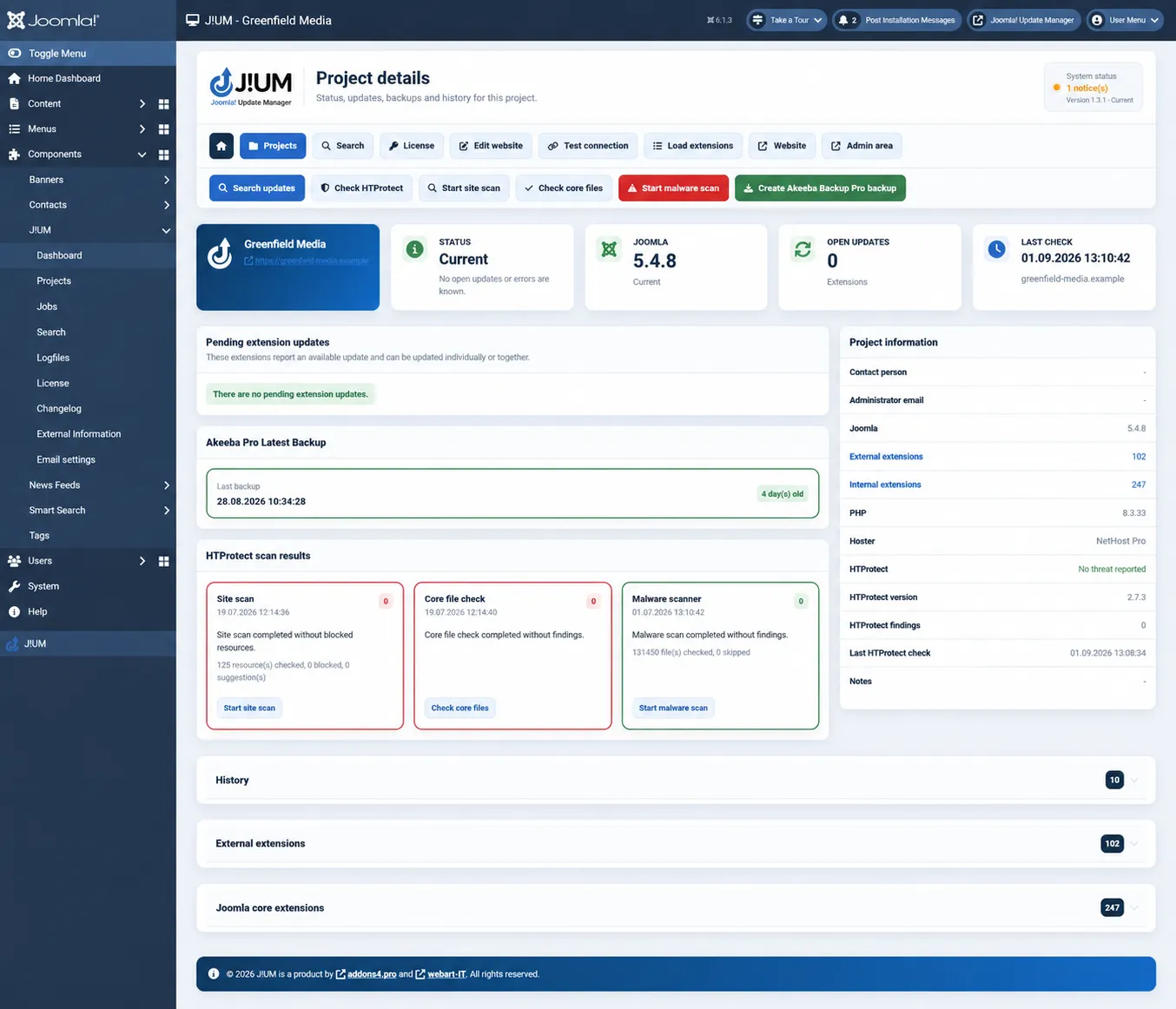
Every connected website has its own project view containing the information required for day-to-day Joomla administration.
Depending on the connected website and installed extensions, J!UM can provide information such as:
- Joomla version
- PHP version
- Available Joomla updates
- Available extension updates
- Project and customer information
- Internal notes
- Contact information
- Hosting information
- Paid extension information
- Maintenance history
- Connection status
- Last check
- Installed extensions
- External extension information
This turns J!UM into more than an update checker. It also provides a structured technical overview of the Joomla websites you maintain.
Keep an Eye on Akeeba Backup
For websites using Akeeba Backup Pro, J!UM can include backup information in the project status.
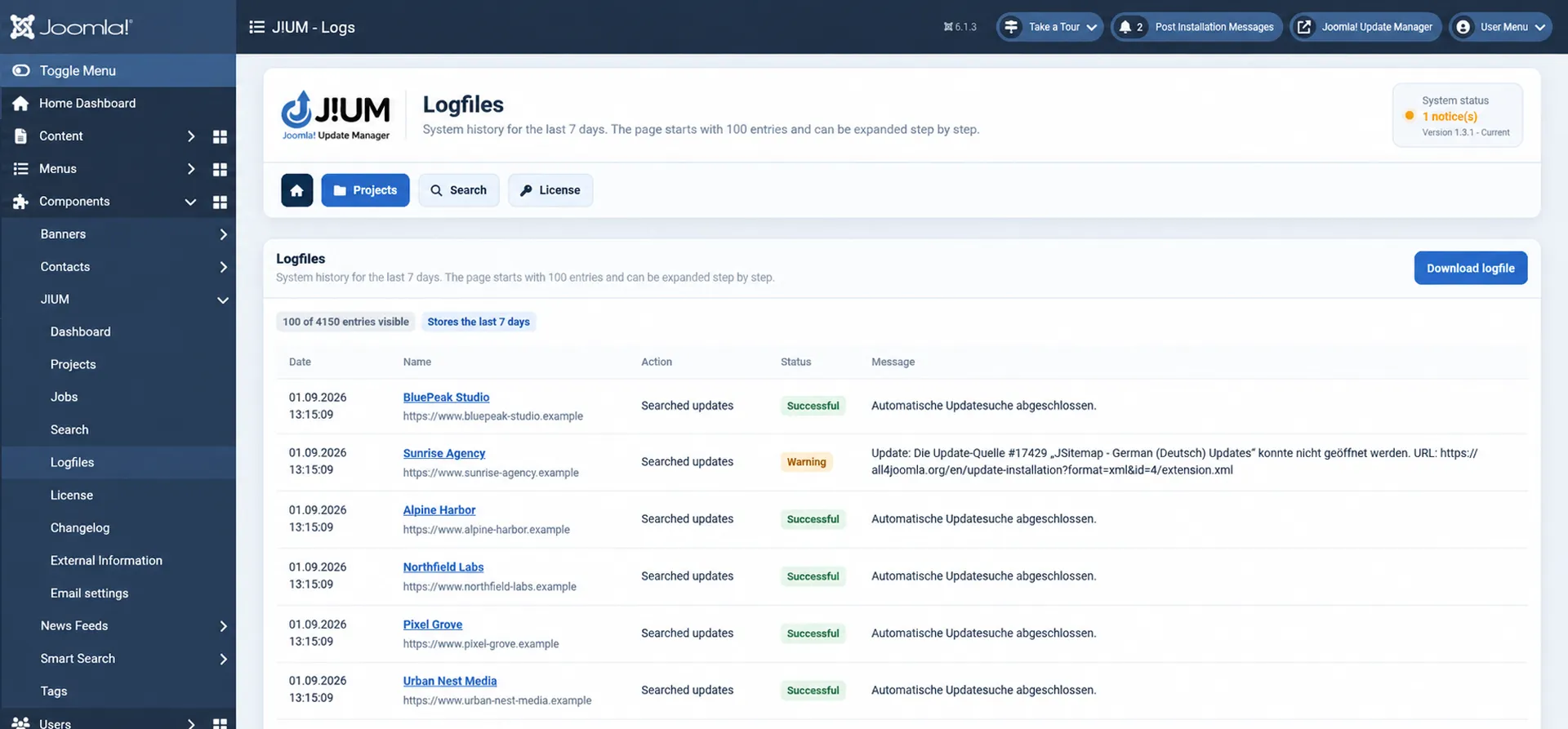
The latest available backup can be evaluated using a clear status indicator, helping administrators identify websites where the most recent backup may be outdated or missing.
This allows backup status to become part of the regular Joomla maintenance workflow instead of being checked separately.
Additional Security Information with HTProtect
Where supported, J!UM can integrate information from HTProtect into the project overview.
Available scan information is evaluated and displayed with an easy-to-understand status indicator, allowing administrators to identify websites where security-related checks may require attention.
This brings additional maintenance and security information into the same workflow used for Joomla updates and project monitoring.
Keep Important Project Information Where You Need It
Technical maintenance often requires more information than Joomla itself provides.
J!UM therefore allows important project information to be maintained alongside the connected website.
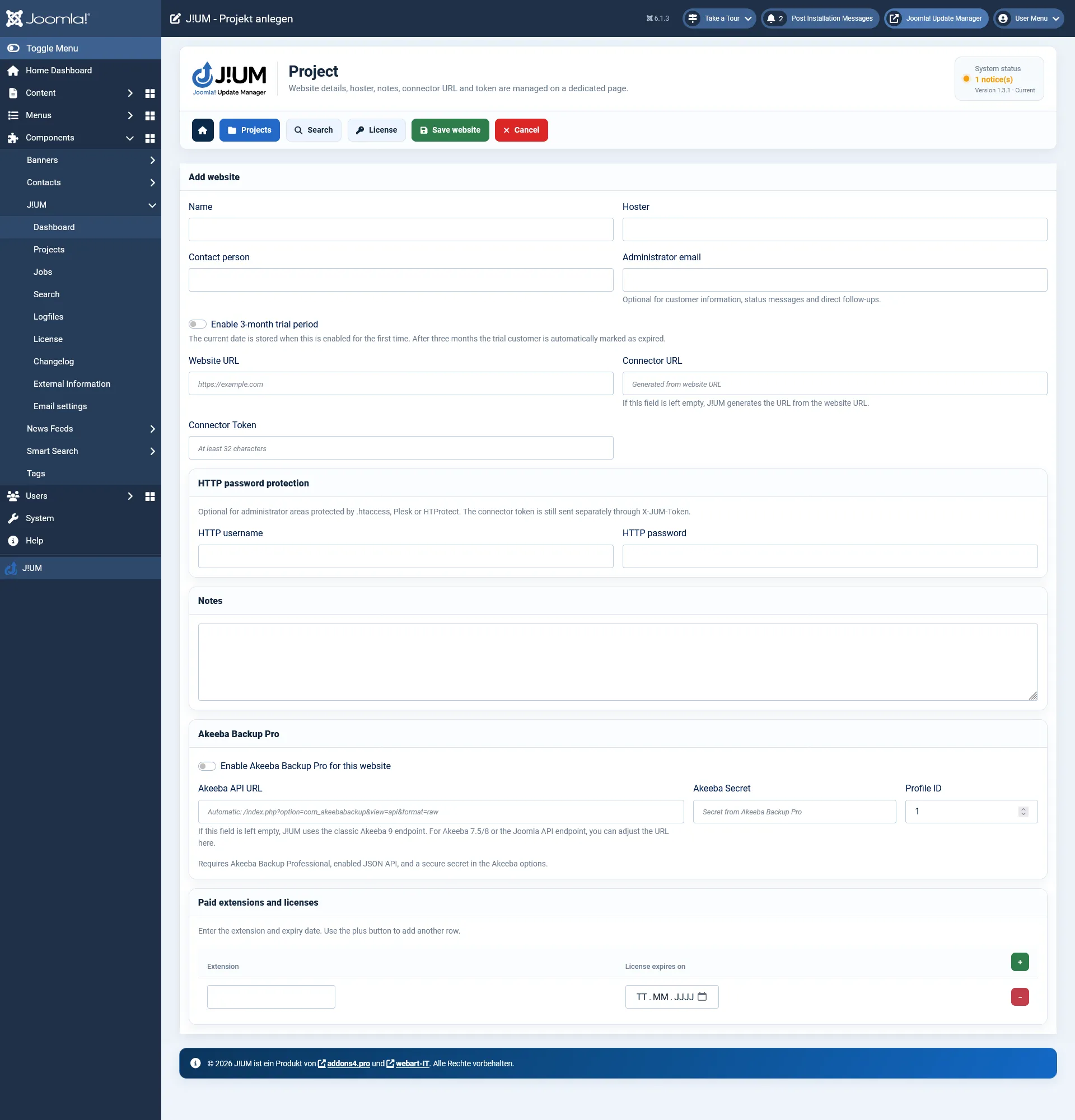
Store relevant details such as contacts, email addresses, hosting information, notes and information about commercial extensions directly with the project.
This is particularly useful for agencies and administrators who maintain websites for multiple customers and need technical information immediately available during maintenance work.
Secure Communication Between J!UM and Your Websites
Connected Joomla websites communicate with J!UM through the dedicated J!UM Connector.
The connector provides the controlled communication layer required to retrieve system and extension information and execute supported maintenance operations.
Separate connector packages are available for supported Joomla versions, allowing J!UM to communicate with Joomla 5 and Joomla 6 installations.
See Which Joomla Websites Need Your Attention
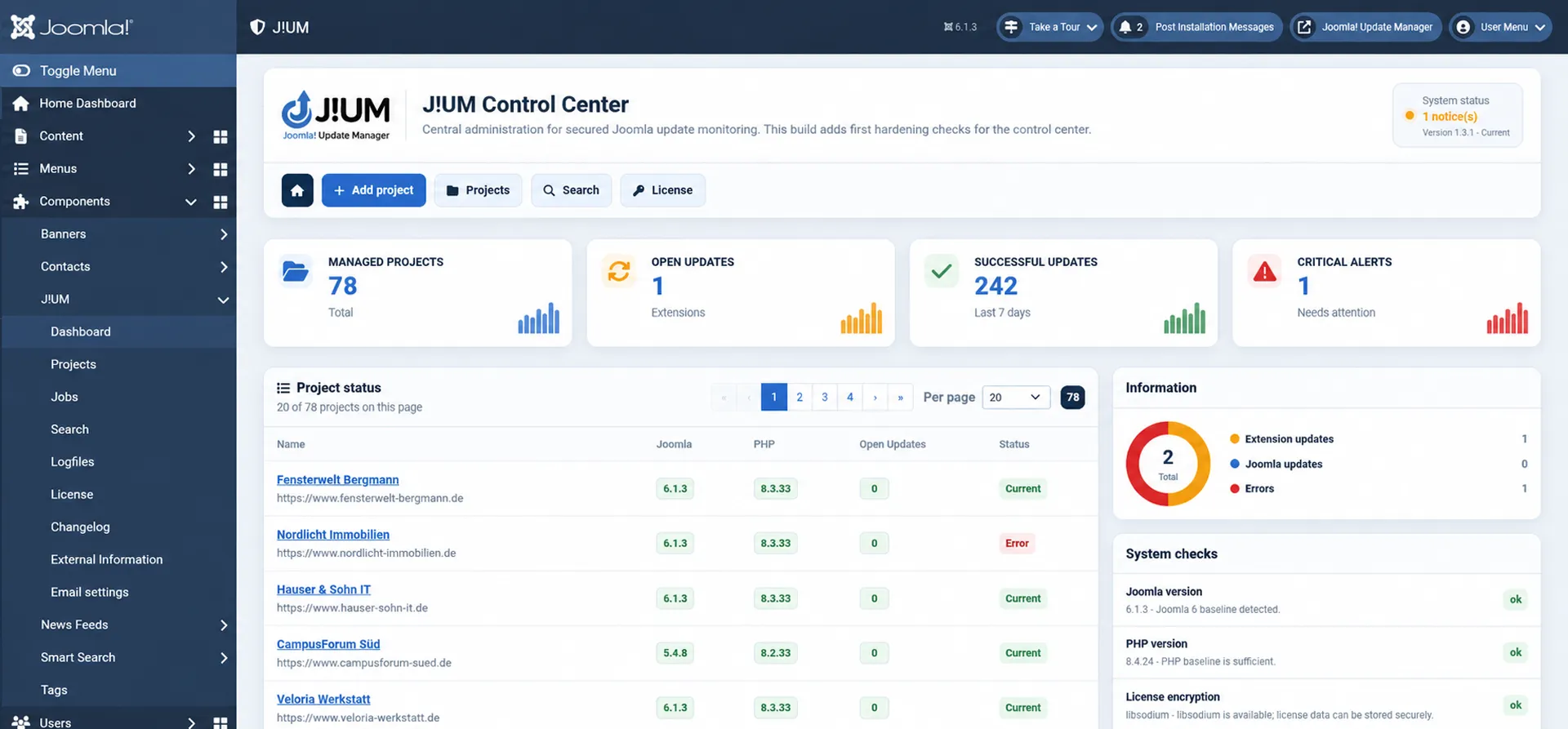
The J!UM dashboard is designed to answer one important question quickly:
Which of my Joomla websites requires attention?
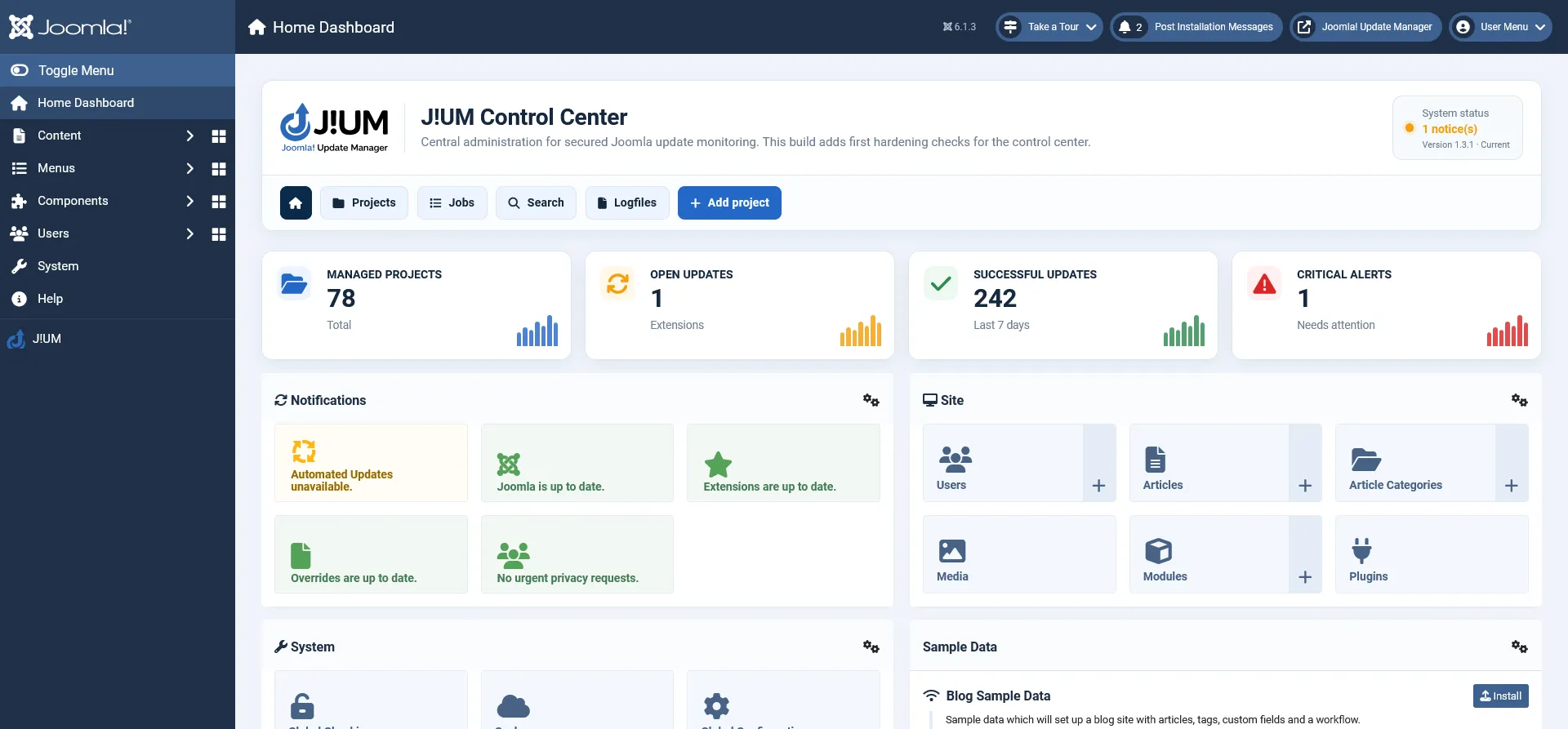
Project status, Joomla information, pending updates and recent checks are brought together in a central overview.
Instead of searching through individual administrator dashboards, you can start your maintenance work from a single control center.
Choose the J!UM Plan That Fits Your Projects
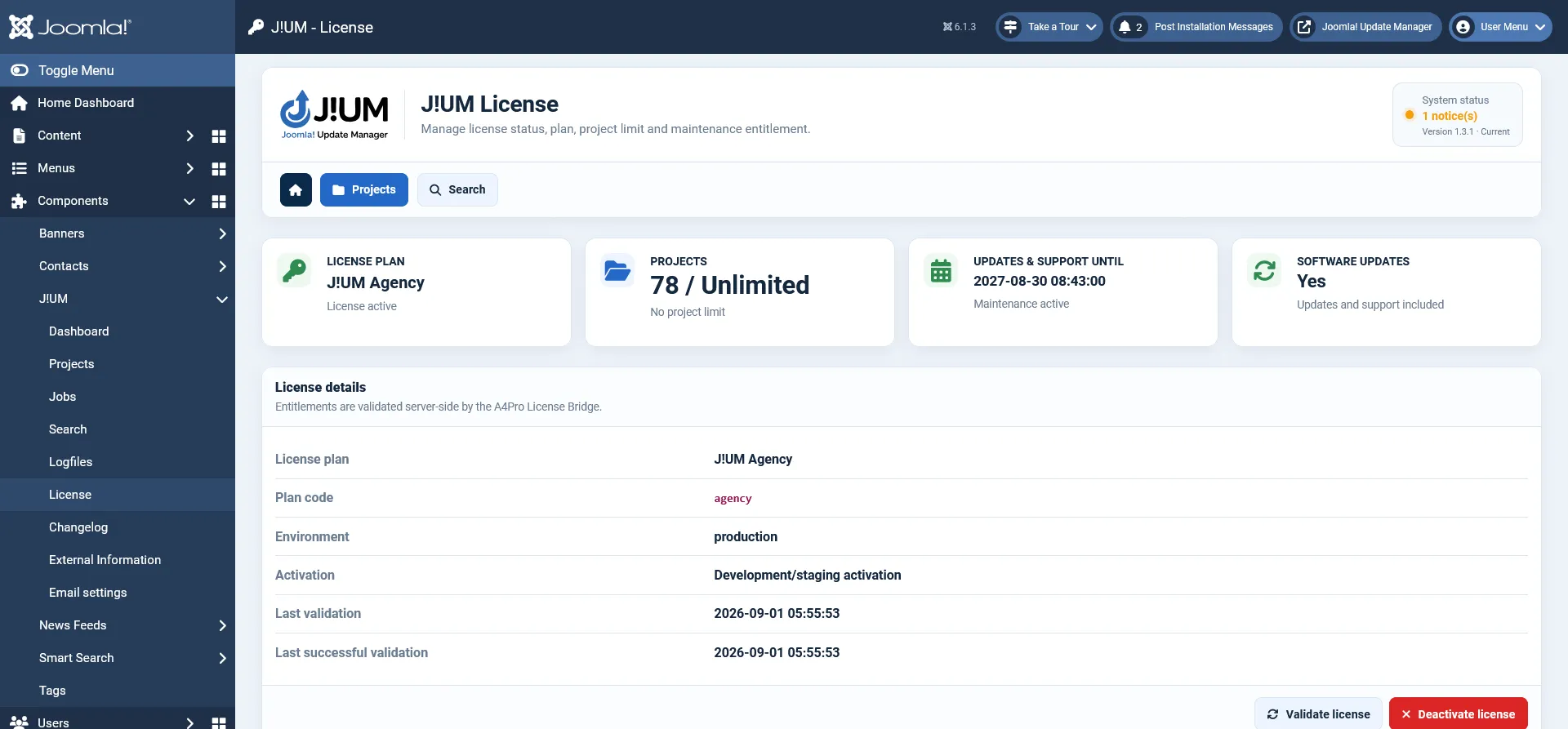
Every J!UM plan includes the complete feature set.
There are no feature restrictions between Starter, Professional and Agency. Simply choose the plan based on the number of Joomla projects you want to manage.
The project limit defines how many Joomla websites can be actively managed through your J!UM installation.
All plans provide the same J!UM functionality. Upgrading to a larger plan increases the number of projects you can manage without changing your workflow or feature set.
Secure License and Update Management
J!UM uses the addons4.pro licensing and protected update infrastructure.
A valid J!UM license enables access to protected product updates and associated product services.
The licensing system provides controlled product activation and protected update delivery while integrating with the established Joomla update workflow.

Frequently Asked Questions

Tags
Key Features
- Central management of multiple Joomla websites
- Focused Joomla extension management
- Joomla 5 and Joomla 6 support
- Central project dashboard
- Extension update monitoring
- Central extension information
- Cross-project extension search
- Identify affected websites by extension
- Supported extension update operations
- Structured maintenance jobs
- Job and process status tracking
- Detailed project information
- Joomla version information
- PHP version information
- Connection status monitoring
- Last-check information
- Internal project notes
- Customer and contact information
- Hosting information
- Commercial extension documentation
- Maintenance history
- Akeeba Backup Pro status integration
- HTProtect status integration
- Dedicated J!UM Connector
- German and English administration
- Secure license management
- Protected product updates
- Starter, Professional and Agency plans
- Same complete feature set across all plans
- Up to 5, 25 or unlimited managed Joomla projects
Requirements
Joomla
- Joomla 5.x or Joomla 6.x
- Supported PHP version for the installed Joomla release
- Outgoing HTTPS connections
- Permission to install and manage Joomla extensions
- A valid J!UM license for protected updates and product services
Connected Joomla Websites
- Joomla 5.x or Joomla 6.x
- Corresponding J!UM Connector
- HTTPS connection between J!UM and the connected website
- Permission to retrieve the required Joomla system and extension information
Installation and Setup
Joomla Installation
- Download the J!UM installation package from your addons4.pro customer account.
- Do not extract the installation package.
- Open the Joomla administrator area of the website that will serve as your J!UM management system.
- Go to System → Install → Extensions.
- Upload the complete J!UM installation package.
- Wait until Joomla confirms that the package has been installed successfully.
- Open J!UM from the Joomla administrator area.
Connect Your First Joomla Website
- Download the appropriate J!UM Connector for the Joomla version of the website you want to manage.
- Install the connector on the remote Joomla website.
- Configure the connection according to the J!UM documentation.
- Create a new project in J!UM.
- Enter the required website and connection information.
- Test the connection.
- Load the website and extension information.
- Review the project status in J!UM.
Documentation
Changelog
Version 1.3.1
Improved update reliability for larger Joomla environments
- Improved protected connector update handling for larger Joomla project environments.
- HTTP 429 rate-limit responses no longer consume regular project update attempts.
- Deferred connector updates remain pending and are retried automatically.
- Improved reliability of automated update batches across multiple Joomla websites.
- Existing connector authorization, maintenance and project update workflows remain unchanged.
Version 1.3.0
Protected J!UM Client Connector updates
- Added protected update-ticket handling for J!UM Client Connector plugins on Joomla 5 and Joomla 6.
- Connector update authorization is requested only when the connector itself is selected for update.
- Release authorization is restricted to the exact protected connector package.
- Existing project, update, licensing and maintenance workflows remain unchanged.
Version 1.2.2
Maintenance entitlement validation
- Improved validation of expired maintenance periods while preserving the purchased J!UM entitlement.
- Existing project limits remain usable after maintenance expires.
- Protected software updates and support require an active maintenance entitlement.
- No functional changes to existing J!UM workflows.
Version 1.2.1
Protected update channel validation
- Improved validation of the protected J!UM update channel.
- Update packages are delivered only after valid license and ticket authorization.
- Existing one-time ticket and protected download mechanisms remain unchanged.
- No functional feature changes.
Version 1.2.0
Protected automatic update channel
- Activated the protected J!UM package update channel for Joomla.
- Added license-based authorization through the A4Pro License Bridge and protected Download Gateway.
- Update downloads require a valid maintenance entitlement and short-lived one-time ticket.
- The long-lived license client token is never exposed in the package download URL.
- Established a permanent release filename for future J!UM online updates.
Version 1.1.3
Stable protected release structure
- Moved J!UM updates to the permanent package filename used by the protected update channel.
- Updated the package feed to the canonical J!UM Joomla update path.
- Restricted installer authorization to the exact protected J!UM release path.
- Prepared existing installations for subsequent protected online updates.
Version 1.1.2
Protected update bootstrap
- Added the installer plugin required for protected J!UM package updates.
- Added short-lived, single-use update ticket requests through the A4Pro License Bridge.
- Restricted update authorization to HTTPS, the defined update host and the exact J!UM package.
- Protected tickets are validated for product, platform, filename and lifetime.
- Other Joomla Core and third-party extension updates remain unaffected.
Version 1.1.1
License cleanup and error handling
- Fixed removal of inactive local J!UM license bindings.
- Encrypted license and token values are now reliably cleared when an inactive binding is removed.
- Inactive licenses no longer trigger unnecessary remote deactivation attempts.
- Improved user-facing messages for invalid keys, activation limits, expired maintenance, rate limits and server errors.
- Active licenses continue to require the normal protected deactivation process.
Version 1.1.0
Native J!UM licensing
- Added native license activation, validation and deactivation through the A4Pro License Bridge.
- Added Starter, Professional and Agency license plans with project limits.
- Added a dedicated license view with plan, project usage, maintenance and update entitlement information.
- Added encrypted local storage for license credentials using libsodium.
- Added automatic periodic license validation.
- Project creation is now enforced against the activated license limit.
- Expired maintenance keeps the purchased plan usable while updates and support become unavailable.
- Added additional protection for license communication, CSRF, ACL and local credentials.
Version 1.0.10
Improved version and update information
- Restored J!UM version and package update information across administrator pages.
- Restored version and update status in the Joomla Home Dashboard panel.
- Version information now follows the actually installed J!UM package instead of a hard-coded value.
Version 1.0.9
Dashboard integration refinement
- Restricted the J!UM dashboard panel to Joomla’s main administrator Home Dashboard.
- Excluded unrelated Joomla component dashboards from rendering the J!UM panel.
- Existing ACL protection and native Joomla dashboard integration remain unchanged.
Version 1.0.8
Administrator sidebar integration
- Added a dedicated J!UM shortcut to the Joomla administrator sidebar.
- The shortcut links directly to the J!UM Control Center.
- Access remains restricted to authorized J!UM administrators.
- No Joomla Core or Atum template files are modified.
Version 1.0.7
New J!UM Control Center dashboard panel
- Replaced the previous Quickicon dashboard with a complete J!UM Control Center header.
- Added direct navigation to projects, jobs, search, logfiles and project creation.
- Added dashboard statistics for managed projects, open updates, successful updates and critical notices.
- Dashboard information uses the existing J!UM servi