
Requires YOOtheme Pro for Joomla or WordPress. YOOtheme Pro is a separate third-party product and is not included with this add-on.




Product Overview
PDF FlipBook Addon for YOOtheme Pro
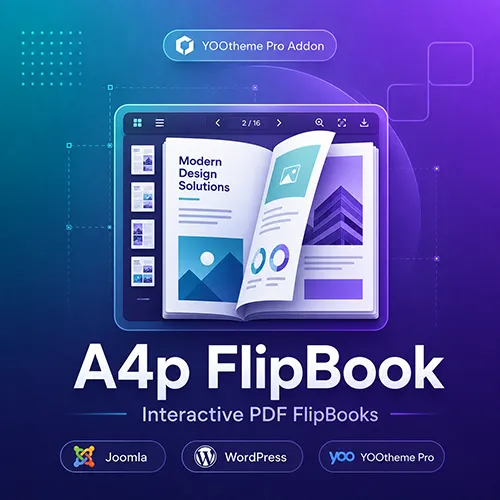
A4p FlipBook adds a dedicated flipbook element to YOOtheme Pro. It transforms an existing PDF document into an interactive book-style presentation that visitors can browse directly on your website.
Instead of sending visitors to a plain PDF file or displaying the document in a basic browser frame, you can present it with animated page turns, familiar navigation controls and an engaging reading interface.
The element is available for both Joomla and WordPress and can be configured directly inside the familiar YOOtheme Pro Builder.
Ideal for Digital Publications
The FlipBook element is suitable for many types of PDF content, including:
- Product catalogs
- Brochures
- Digital magazines
- Company presentations
- Portfolios
- Price lists
- Restaurant menus
- Travel guides
- Annual reports
- Instruction manuals
- Event programs
- Property brochures
Upload or select your PDF, add the element to a YOOtheme Pro layout and adjust its appearance to match your website.
Interactive PDF Navigation
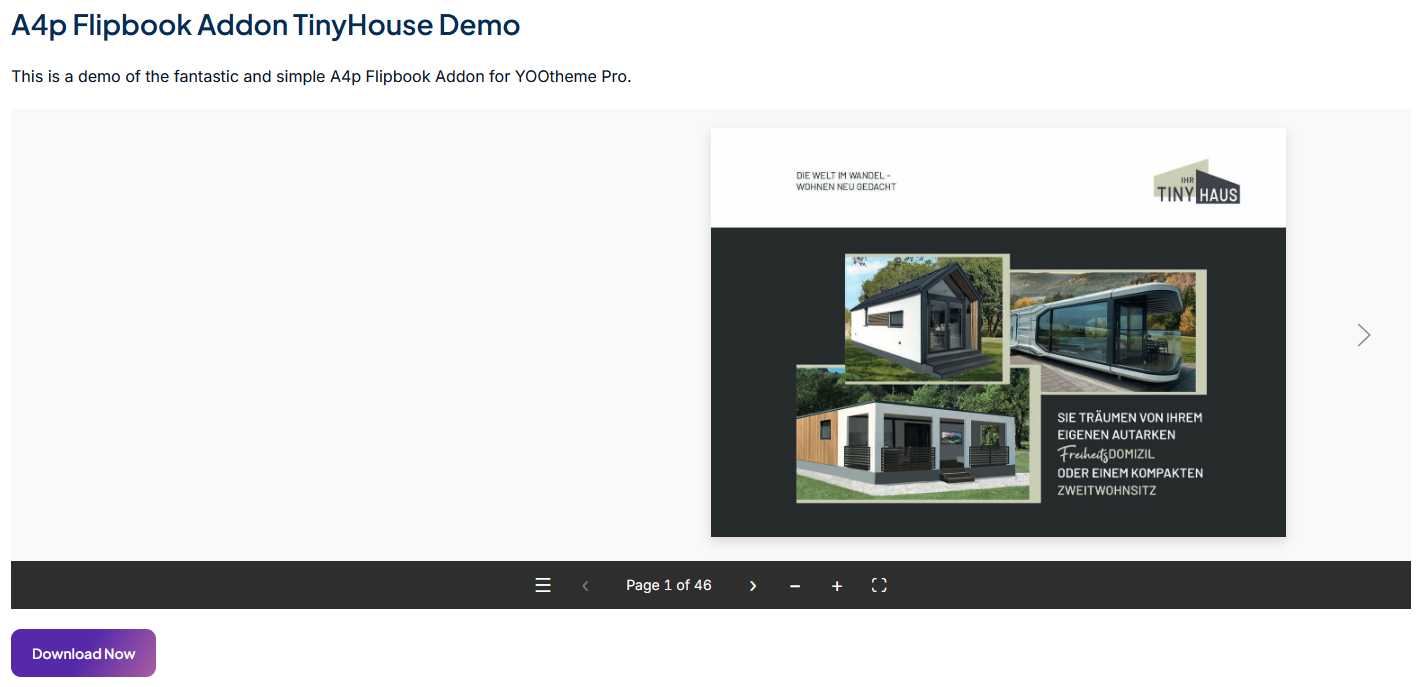
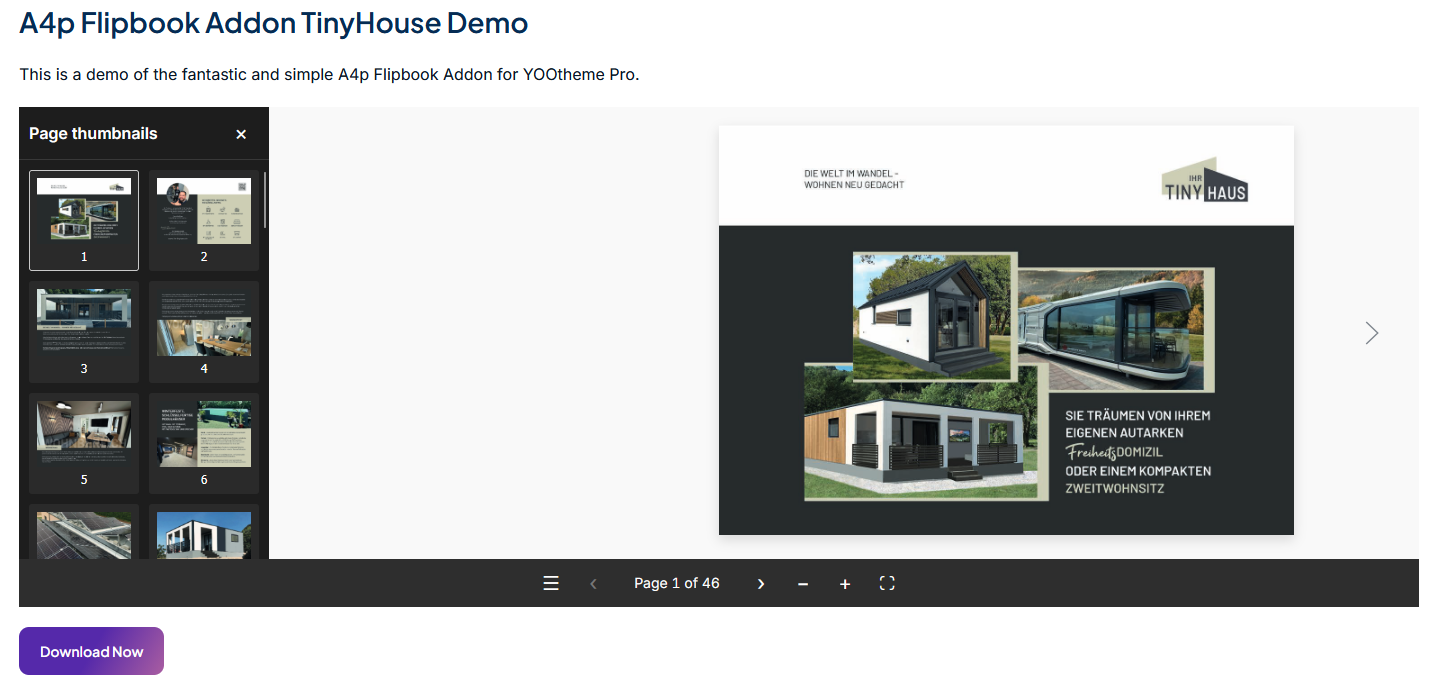
Visitors can browse the document using a realistic page-turning interface. The integrated toolbar provides convenient reading controls, including:
- Previous and next page navigation
- First and last page navigation
- Page number selection
- Thumbnail navigation
- Zoom in and zoom out
- Fit-to-screen view
- Fullscreen mode
- Single-page and double-page views
- Optional page-turn sound
- Optional PDF download
- Automatic playback controls
- Sharing controls
Available controls may adapt to the visitor’s device, browser and available display space.
Configure the Flipbook in YOOtheme Pro
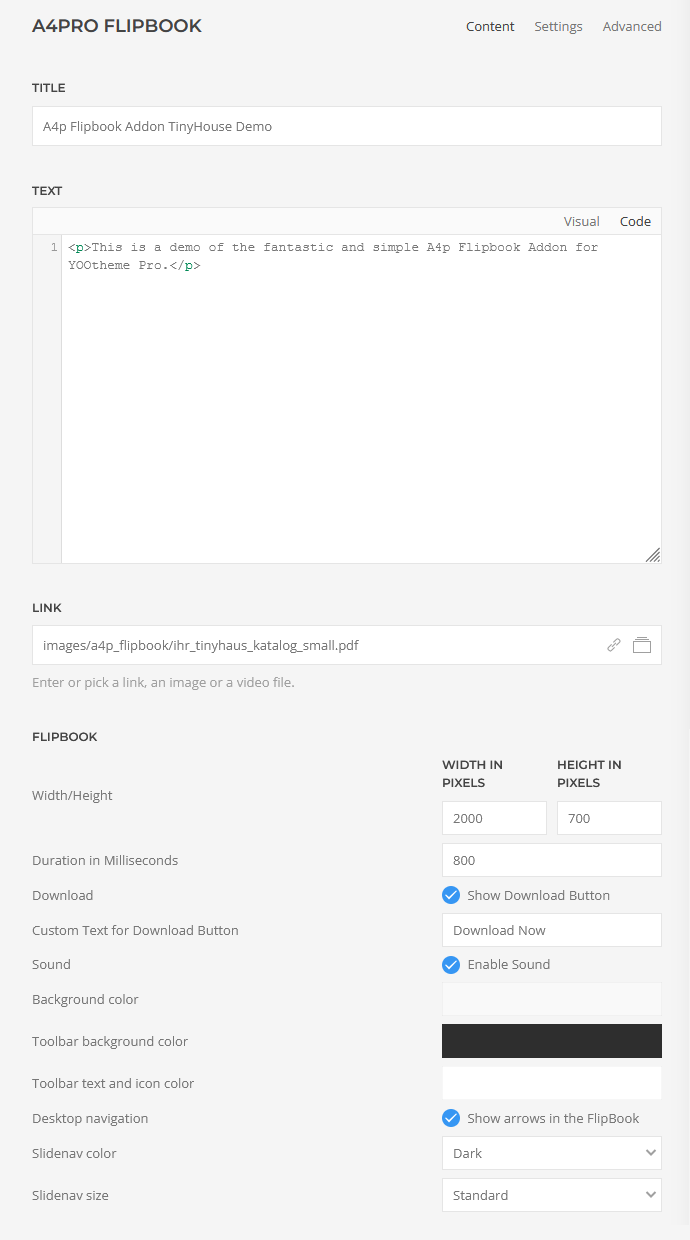
The element provides practical settings for the document and its presentation:
- PDF file or PDF URL
- Optional title
- Optional descriptive text
- Maximum flipbook width
- Flipbook height
- Page-turn animation duration
- Page-turn sound
- Background color
- PDF download option
- Custom download button text
- Download button style, size and width
- Optional opening of the download in a new window
The title, description and download button can use YOOtheme Pro’s standard typography, color, alignment, spacing, animation, visibility and positioning controls.
Match the Element to Your Website
Choose a background color and define the dimensions of the reader to integrate the flipbook into your page design.
The configured width acts as a maximum width, allowing the element to fit into narrower layout areas. The height is set explicitly in the Builder, giving you control over the amount of vertical space used by the document.
YOOtheme Pro’s standard responsive visibility, maximum-width and alignment options can also be applied to the element.
For the best results, review the configured height at the breakpoints used by your website.
Optional PDF Download
You decide whether visitors may download the displayed PDF.
When downloads are enabled, the element can show a separate YOOtheme-styled download button below the flipbook. The button text can be customized—for example:
- Download PDF
- Download Catalog
- Save Brochure
- Download Price List
If no custom text is entered, the element uses “Download” as its fallback label.
The download button can use YOOtheme Pro’s standard button styles and may optionally open the document in a new browser window.
Page-Turn Sound and Animation
The page-turn sound can be enabled or disabled for each flipbook. You can also adjust the animation duration to create a quicker or more relaxed page-turning experience.
These settings make it possible to adapt the reading experience to the type of publication and the style of your website.
Built for Joomla and WordPress
The same core FlipBook element is available for both supported platforms. This provides a consistent workflow for agencies and website owners working with YOOtheme Pro across Joomla and WordPress projects.
Separate installation packages are provided for each platform.
Multilingual and RTL-Aware
The Builder interface includes German and English translations. Additional English and German locale variants are included in the WordPress package.
The reader also detects right-to-left website languages and changes the page direction accordingly.
The title, description, PDF selection and custom download label can be managed within the corresponding YOOtheme Pro layout and language workflow.
Safe PDF and Content Handling
The element accepts local or remote PDF addresses using standard HTTP or HTTPS URLs. Unsupported URL schemes and files that do not identify as PDFs are rejected.
Title, description, dimensions, colors and download labels are validated before output. If WebGL rendering cannot initialize correctly, the reader can retry using a non-WebGL presentation mode.
Secure Licensing and Automatic Updates
A valid addons4.pro licence enables update access for the selected platform.
Both Joomla and WordPress versions support licence activation and deactivation, encrypted local credential storage and automatic update discovery. Update downloads are authorized using short-lived, single-use tickets rather than exposing long-lived licence credentials in release URLs.
Important Usage Notes
Use Web-Optimized PDF Files
Large or highly complex PDF documents can take longer to download and render. Optimize images and file size before publishing, especially when the document contains many pages.
PDF Hosting Must Permit Browser Access
A remotely hosted PDF must be publicly accessible through HTTP or HTTPS. The remote server may also need to permit the browser to load the document from your website.
Height Is Configured Manually
The element width can adapt to a narrower container, but the flipbook height is configured explicitly. Check this setting at the responsive breakpoints used by your layout.
Download Protection Is Not Included
Disabling the download button removes the provided download controls, but it does not turn a publicly displayed PDF into a protected document. The browser must still be able to access the PDF to display it.
The Add-on Does Not Edit PDFs
The FlipBook element displays existing PDF documents. It does not create, merge, compress or edit PDF files.

Frequently Asked Questions

Tags
Key Features
- Dedicated FlipBook element for YOOtheme Pro
- Available for Joomla and WordPress
- Interactive presentation of PDF documents
- Animated page-turning effect
- Previous, next, first and last page navigation
- Page number navigation
- Thumbnail overview
- Zoom controls
- Fit-to-screen view
- Fullscreen mode
- Single-page and double-page presentation
- Optional automatic playback
- Optional page-turn sound
- Optional PDF download
- Custom download button text
- YOOtheme Pro button styles and sizes
- Configurable width and height
- Configurable animation duration
- Custom background color
- Optional title and descriptive text
- YOOtheme Pro typography and color settings
- Standard YOOtheme Pro alignment, spacing and visibility controls
- German and English Builder interface
- Right-to-left page direction support
- WebGL rendering with automatic fallback
- Secure licence activation and deactivation
- Licensed automatic updates
- No coding required
Requirements
Joomla
- Joomla 4, Joomla 5 or Joomla 6
- YOOtheme Pro
- PHP 8.1 or newer
- Modern browser with JavaScript enabled
- Active addons4.pro licence for automatic updates
WordPress
- WordPress 6.0 or newer
- YOOtheme Pro
- PHP 8.0 or newer
- Modern browser with JavaScript enabled
- Active addons4.pro licence for automatic updates
Recommended Product Configuration
- Joomla 6 or a current supported WordPress release
- YOOtheme Pro 5
- HTTPS website
- Optimized PDF files suitable for web delivery
YOOtheme Pro is required and is not included with the add-on.
Installation and Setup
Joomla
- Install and activate YOOtheme Pro.
- Install the Joomla FlipBook package through the Joomla extension installer.
- Open the plugin settings and activate your licence.
- Make sure the A4Pro FlipBook system plugin is enabled.
- Clear the Joomla and YOOtheme Pro caches.
- Open YOOtheme Pro and add the A4Pro FlipBook element to your layout.
WordPress
- Install and activate YOOtheme Pro.
- Install the WordPress FlipBook ZIP file through the WordPress plugin installer.
- Activate the A4Pro FlipBook plugin.
- Enter and activate your licence in the plugin settings.
- Clear any website and YOOtheme Pro caches.
- Open YOOtheme Pro and add the A4Pro FlipBook element to your layout.
Adding a Flipbook
- Add the A4Pro FlipBook element in YOOtheme Pro.
- Select or enter the PDF file.
- Add an optional title and description.
- Define the maximum width and height.
- Choose the background color.
- Configure the page-turn duration and sound.
- Enable or disable PDF downloads.
- Customize and style the download button if required.
- Check the result on desktop, tablet and mobile breakpoints.
Documentation
How to install a Joomla or WordPress extension
Installation Guide Joomla
Installation Guide WordPressa
View Demo Joomla
View Demo WordPress
Changelog
Version 3.0.1 — Joomla and WordPress
JED Compliance and Maintenance Update
- Improved Joomla Extensions Directory compliance for the Joomla package.
- Added the required GPL license notices to all included Joomla PHP files.
- Added Joomla execution guards to prevent direct access to PHP files.
- Updated the Joomla plugin naming convention to comply with JED requirements.
- Improved internal handling and storage of encrypted license data while maintaining compatibility with existing installations.
- Removed legacy Base64 encoding patterns flagged by the JED Checker.
- Adjusted internal input validation patterns to avoid false-positive anti-malware warnings without changing validation behavior.
- Verified the Joomla package successfully against the JED Checker requirements.
- Synchronized the Joomla and WordPress release versions to 3.0.1.
- No changes were made to the PDF.js renderer, page-turn animations, touch and swipe navigation, toolbar, Slidenav, zoom, fullscreen or thumbnail functionality.
- No changes were made to the existing license validation or protected update delivery process.
Version 3.0.0 — Joomla and WordPress
Major Renderer, Mobile and Security Update
- Replaced the legacy FlipBook rendering stack with a modern PDF.js 6.3.289 based renderer.
- Improved compatibility with current desktop and mobile browsers.
- Added reliable touch and swipe navigation for smartphones and tablets.
- Improved responsive rendering in portrait and landscape orientation.
- Added optional desktop Slidenav navigation using the native UIkit Slidenav component.
- Added Slidenav light and dark color modes.
- Added standard and large Slidenav size options.
- Added configurable toolbar background, text and icon colors.
- Improved page-turn animations and the transition between the cover page and double-page spreads.
- Improved double-page alignment and removed unwanted gaps between pages.
- Optimized PDF page shadows, spacing and internal padding.
- Removed unnecessary shadows from the thumbnail overview and hidden navigation panels.
- Improved zoom, fullscreen and thumbnail navigation behavior.
- Improved PDF scaling across different screen sizes and pixel densities.
- Fixed WordPress package structure to ensure clean upgrades from existing 2.x installations.
- Removed obsolete WebGL, Three.js and legacy dFlip renderer dependencies.
- Hardened PDF handling by disabling unnecessary scripting and sandbox components.
- Strengthened input validation, sanitization, URL checks and update package verification.
- Improved overall security against XSS, unsafe input handling and update-related attack vectors.
- Verified compatibility with Joomla 5, Joomla 6, WordPress and YOOtheme Pro 5.
Version 2.0.3 — Joomla and WordPress
Update Delivery Maintenance
- Completed compatibility and delivery checks for the secure addons4.pro update channel.
- Improved release reliability for licensed Joomla and WordPress installations.
- No changes were made to the FlipBook element or its presentation features.
Version 2.0.1 — Joomla and WordPress
More Secure Update Downloads
- Introduced short-lived, single-use authorization tickets for extension downloads.
- Prevented long-lived activation credentials from being included in release requests.
- Improved recovery of existing WordPress update authorization following an upgrade.
- Preserved encrypted licence information during validation and recovery.
Version 2.0.0 — Joomla and WordPress
Licensed Automatic Updates
- Added secure licence activation and deactivation.
- Added automatic update discovery through dedicated Joomla and WordPress update channels.
- Restricted update downloads to active, non-expired licences.
- Added encrypted local storage for licence credentials and activation tokens.
- Added periodic licence validation and an additional check before protected downloads.
- Added German and English licence administration.
- Improved validation of PDF URLs, dimensions, colors, labels and editor content.
- Improved WebGL initialization reliability with an automatic rendering fallback.
- Added stricter validation of update servers and release paths.
- Preserved an existing valid activation if a replacement licence cannot be activated.
Version 1.38 — WordPress
Custom Download Labels
- Added an optional custom label for the PDF download button.
- Added the new setting directly below the download option in the Builder.
- Added translated field labels for German and English installations.
- Retained “Download” as the automatic fallback when no custom label is entered.
- Improved safe output of custom button labels.
Version 1.3.7 — Joomla
Custom Download Labels
- Added an optional custom label for the PDF download button.
- Added the new setting directly below the download option in the Builder.
- Added German and English translations for the new field.
- Retained “Download” as the fallback when the custom field is empty.
- Improved safe output of custom button labels.
Earlier Product Development
Initial FlipBook Element
The original product line introduced a dedicated YOOtheme Pro element for displaying PDF documents as interactive flipbooks on Joomla and WordPress.
The initial functionality established the core customer features that continue in the current version:
- PDF selection
- Animated page navigation
- Configurable reader dimensions
- Page-turn sound
- Optional downloads
- Background color settings
- Title and descriptive content
- YOOtheme Pro styling and layout controls
No reliable public version numbers or release dates for these earliest development milestones were found in the current packages, so they should not be presented as separately numbered releases.