
To use this add-on, you need YOOtheme Pro for Joomla or WordPress. YOOtheme Pro is a separate third-party product and is not included with this package.






Product Overview
Advanced Slideshow Addon for YOOtheme Pro
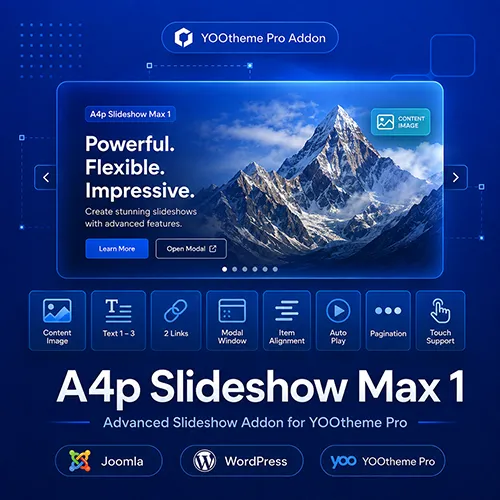
A4p Slideshow Max 1 is an extended slideshow element for YOOtheme Pro on Joomla and WordPress.
It retains the familiar structure and design options of the standard YOOtheme Pro Slideshow while adding content fields and link options that are frequently required in real-world projects.
Each slideshow item can combine:
- An image or video
- A title
- Meta information
- Three additional text fields
- Main content
- A separate content image
- Two independent links or buttons
- Modal content for either link
- Individual text alignment
This gives designers and developers more flexibility without requiring custom HTML or a separately developed slideshow element for every project.
Three Additional Text Fields
Every slide includes three additional optional text fields named Text1, Text2 and Text3.
These fields supplement the standard title, meta and content areas and make it possible to create a clearer and more detailed content hierarchy within the same slide.
The additional text fields are useful for:
- Eyebrow text
- Subtitles
- Product categories
- Prices
- Promotional information
- Technical details
- Short facts
- Image descriptions
- Campaign messages
- Additional calls to action
Text1 is displayed above the main content, while Text2 appears below it. Text3 can be used together with the separate content image and is suitable for captions or additional image-related information.
Each text field provides familiar YOOtheme Pro styling options, including text style, color, HTML element, spacing and parallax settings.
Separate Content Image
In addition to the regular slideshow image or video, every slide can contain a separate content image inside the overlay.
This makes it possible to use the main slideshow image as a visual background while displaying another image together with the text content.
The content image is useful for:
- Product images
- Portraits
- Logos
- Illustrations
- Packaging
- Screenshots
- Diagrams
- Supporting visual content
Available settings include:
- Top, bottom, left, right or inline alignment
- Grid width
- Column and row gaps
- Responsive stacking breakpoint
- Vertical alignment
- Width and height
- Focal point
- Loading behavior
- Border style
- Box shadow
- Alternative text
- Individual spacing
This makes A4p Slideshow Max 1 suitable for split-content hero sections, product presentations and editorial image-and-text layouts.
Two Independent Links
Each slide supports two independent links or buttons.
Both links provide their own destination, visible text and accessible ARIA label. The second link also includes independent style, size, width and link-attribute settings.
The links can be used for different actions, for example:
- Learn more
- Buy now
- View product
- Watch video
- Download
- Open demo
- Read documentation
- Contact us
- Request a quote
- View related content
Spacing between the first and second button can be adjusted using native UIkit spacing options.
Modal Support for Both Links
The first and second links can independently open their destination inside a modal window.
Modal presentation is suitable for:
- YouTube and Vimeo videos
- Images
- Embedded pages
- Interactive previews
- Product demonstrations
- External content
- Iframe-based applications
Modal dimensions can be configured separately for both links.
Supported modal media is loaded when the modal opens and removed again when it closes. This prevents embedded videos from continuing to play in the background after visitors close the modal.
Individual Text Alignment per Slide
The standard slideshow alignment remains available as the global default, but every slide can override the text alignment individually.
This makes it possible to combine different compositions within the same slideshow, for example:
- Left-aligned content on the first slide
- Centered content on the second slide
- Right-aligned content on the third slide
Individual alignment is particularly useful when the position of the image subject changes between slides or when every slide requires its own visual balance.
Images, Videos and Overlays
Slides support images and videos as their primary media.
The element retains familiar YOOtheme Pro controls for:
- Image dimensions
- Image focal point
- Responsive image output
- Video playback
- Media overlays
- Overlay gradients
- Text color over media
- Overlay position
- Overlay width
- Overlay padding
- Overlay animation
- Content width
- Responsive behavior
This allows the extended content fields to be combined with the established YOOtheme Pro slideshow design workflow.
Slideshow Animations and Autoplay
A4p Slideshow Max 1 retains the native slideshow animation and playback options provided by YOOtheme Pro.
Available settings include:
- Slide animations
- Animation velocity
- Autoplay
- Autoplay interval
- Pause on hover
- Ken Burns effect
- Slideshow parallax
- Parallax easing
- Parallax start and end settings
These options can be used to create subtle hero transitions, automatic presentations or more dynamic scrolling experiences.
Navigation and Thumbnails
The element includes the familiar slideshow navigation options from YOOtheme Pro.
Depending on the selected configuration, visitors can navigate using:
- Previous and next controls
- Dot navigation
- Thumbnail navigation
- Navigation above or below the slideshow
- Navigation positioned over the media
Thumbnail dimensions, navigation alignment and responsive visibility can be configured through the element settings.
Responsive Slideshow Layouts
The slideshow can adapt its height according to a defined ratio, the available column height or the browser viewport.
Available layout controls include:
- Slideshow ratio
- Minimum height
- Maximum height
- Viewport-based height
- Section-based height
- Responsive visibility
- Content width
- Overlay width
- Responsive content-image breakpoint
- Image and video focal points
For significantly different desktop and mobile compositions, separate slideshow elements can be created and shown at the appropriate breakpoints.
Multiple Slideshows on One Page
The current version supports multiple independent A4p Slideshow Max 1 elements on the same page.
Each slideshow receives its own runtime identity. Slideshow controls and modal windows remain isolated from other instances, including when elements are copied or separate desktop and mobile variants are used.
This reduces the risk of navigation or modal conflicts in complex layouts.
A Familiar Builder Workflow
A4p Slideshow Max 1 was designed to remain close to the native YOOtheme Pro Slideshow experience.
The parent element contains the general slideshow, animation, navigation, overlay, text and link settings. Individual slideshow items contain the media, additional text fields, content image and link destinations.
This familiar structure makes it easier to move from the standard Slideshow element to the extended version without learning a completely different workflow.
Built for Joomla and WordPress
Separate packages are provided for Joomla and WordPress. Both versions offer the same main slideshow structure and integrate directly into the YOOtheme Pro Builder.
A valid addons4.pro licence enables protected automatic updates for the selected platform.

Frequently Asked Questions

Tags
Key Features
- Extended Slideshow element for YOOtheme Pro
- Joomla and WordPress packages
- Three additional text fields per slide
- Separate content image inside the overlay
- Two independent links or buttons
- Independent modal support for both links
- Configurable modal width and height
- Individual button styles and sizes
- Adjustable spacing between both buttons
- Individual text alignment per slide
- Images and videos
- Media overlays and gradients
- Content-image alignment and grid controls
- Content-image width and height settings
- Content-image focal point
- Content-image border and box shadow
- Responsive content-image stacking
- Slideshow ratio and height controls
- Viewport-based slideshow layouts
- Multiple slide animations
- Autoplay and configurable interval
- Pause autoplay on hover
- Ken Burns effect
- Slideshow parallax
- Dot and thumbnail navigation
- Previous and next controls
- Multiple isolated slideshows per page
- Isolated modal windows
- Familiar YOOtheme Pro Builder workflow
- German and English interface
- Secure licence management
- Licensed automatic updates
- No coding required
Requirements
Joomla
- Joomla 5 or Joomla 6
- YOOtheme Pro
- PHP 8.1 or newer
- PHP Sodium extension for encrypted licence storage
- Active addons4.pro licence for automatic updates
WordPress
- WordPress 6.0 or newer
- YOOtheme Pro
- PHP 8.0 or newer
- Active addons4.pro licence for automatic updates
Recommended Configuration
- Joomla 6 or a current supported WordPress release
- YOOtheme Pro 5
- HTTPS website
- Modern browser with JavaScript enabled
- Optimized images and videos suitable for web delivery
YOOtheme Pro is required and is not included with the add-on.
Installation and Setup
Joomla Installation
- Download the product package from your addons4.pro account.
- Unzip the downloaded package on your computer.
- Locate the Joomla installation ZIP file.
- In Joomla, go to System → Install → Extensions.
- Upload and install the Joomla package.
- Go to System → Manage → Plugins.
- Search for A4Pro Slideshow Max 1.
- Make sure the system plugin is enabled.
- Open its settings and activate your licence.
- Clear the Joomla and YOOtheme Pro caches.
WordPress Installation
- Download and unpack the product package.
- Locate the WordPress installation ZIP file.
- In WordPress, go to Plugins → Add New Plugin → Upload Plugin.
- Upload and install the package.
- Activate A4Pro Slideshow Max 1.
- Open the licence settings and activate your licence.
- Clear WordPress, server and YOOtheme Pro caches where applicable.
Creating a Slideshow
- Open a YOOtheme Pro layout.
- Click Add Element.
- Select A4p Slideshow Max 1.
- Add the required slideshow items.
- Assign an image or video to every slide.
- Enter the title, meta information and main content.
- Add Text1, Text2 and Text3 where required.
- Add an optional content image.
- Configure the first and second links.
- Enable modal presentation where required.
- Configure animation, autoplay and navigation.
- Review the result at all relevant responsive breakpoints.
Documentation
Use the parent element settings to configure:
- Slideshow dimensions
- Animation
- Autoplay
- Ken Burns and parallax
- Navigation
- Previous and next controls
- Overlay layout
- Title and meta styles
- Text1, Text2 and Text3
- Main content
- First link
- Second link
- Responsive visibility
- Custom CSS
Use the individual slideshow-item settings to configure:
- Main image
- Video
- Alternative text
- Title
- Meta information
- Text1
- Main content
- Text2
- Content image
- Text3
- First link destination
- Second link destination
- Individual text alignment
For examples of the available content positions and modal link behavior, use:
How to install a Joomla or WordPress extension
Installation Guide Joomla
Installation Guide WordPressa
Joomla Live Demo
WordPress Live Demo
Both live demos currently use YOOtheme Pro 5.0.39 and show Text1, Text2, Text3, Meta, main content, two links and modal output.
Changelog
Version 2.0.3 — Joomla and WordPress
Update Delivery Maintenance
- Completed compatibility and delivery checks for the secured addons4.pro update channel.
- Improved release reliability for licensed Joomla and WordPress installations.
- No changes were made to the slideshow layout or Builder functionality.
Version 2.0.1 — Joomla and WordPress
More Secure Update Downloads
- Introduced short-lived, single-use authorization tickets for extension downloads.
- Prevented persistent activation credentials from being included in release requests.
- Improved recovery of existing WordPress update authorization following an upgrade.
- Preserved encrypted licence information during validation and recovery.
Version 2.0.0 — Joomla and WordPress
Licensed Automatic Updates
- Added secure licence activation and deactivation.
- Added automatic update discovery through dedicated Joomla and WordPress update channels.
- Restricted protected downloads to active, non-expired licences.
- Added encrypted local storage for licence credentials.
- Added WordPress update-package integrity verification.
- Added German and English licence administration.
- Improved validation of links, media and formatted content.
- Improved safe output inside the YOOtheme Pro Builder preview.
- Improved update-server and release-path validation.
Version 1.24 — Joomla and WordPress
Multiple Slideshow Instances
- Improved isolation between multiple slideshow elements on the same page.
- Prevented conflicts after copying or duplicating slideshow elements.
- Improved support for separate desktop and mobile slideshow variants.
- Isolated slideshow controls and modal IDs per element instance.
- Improved reliability inside the Builder preview.
Version 1.21–1.22
Stable Joomla and WordPress Packages
- Finalized the stable Joomla release.
- Introduced the stable WordPress package.
- Added WordPress-specific installation and integration files.
- Improved platform-specific URL and content handling.
- Added German and English locale fallbacks.
- Improved compatibility and security across both platforms.
Version 1.18–1.20
Three Additional Text Fields
- Added Text1, Text2 and Text3 to slideshow items.
- Added independent visibility controls for the three additional fields.
- Added separate global styling options.
- Positioned Text1 above the main content and Text2 below it.
- Added Text3 output in combination with the content image.
- Added individual alignment settings for Text3.
- Improved field labels and frontend content order.
Version 1.11
Individual Slide Alignment
- Added individual text-alignment settings to slideshow items.
- Allowed individual slides to override the global alignment.
- Retained the global alignment as the default fallback.
Version 1.05–1.10
Separate Content Images
- Added a separate content image to every slideshow item.
- Added top, bottom, left, right and inline positioning.
- Added responsive grid width, gaps and stacking breakpoints.
- Added width, height, focal-point and loading controls.
- Added border and box-shadow settings.
- Improved responsive YOOtheme Pro image rendering.
- Improved Builder visibility of content-image dimensions.
Version 1.02–1.04
Second Link and Modal Support
- Added a second independent link or button to every slide.
- Added separate button style, size and full-width settings.
- Added adjustable spacing between the first and second button.
- Added modal support for both links.
- Improved modal rendering for images, videos and iframe content.
- Ensured supported embedded media stops when a modal is closed.
Version 1.01
Initial Joomla Release
- Introduced the extended Slideshow Max 1 element for YOOtheme Pro.
- Added a second link with separate URL, text and ARIA-label fields.
- Retained the familiar YOOtheme Pro slideshow, button and parallax settings.
- Added Joomla system-plugin integration.
- Added German and English interface translations.