

Requires Joomla, YOOtheme Pro and the Event Booking component. YOOtheme Pro and Event Booking are third-party products and must be purchased and installed separately.
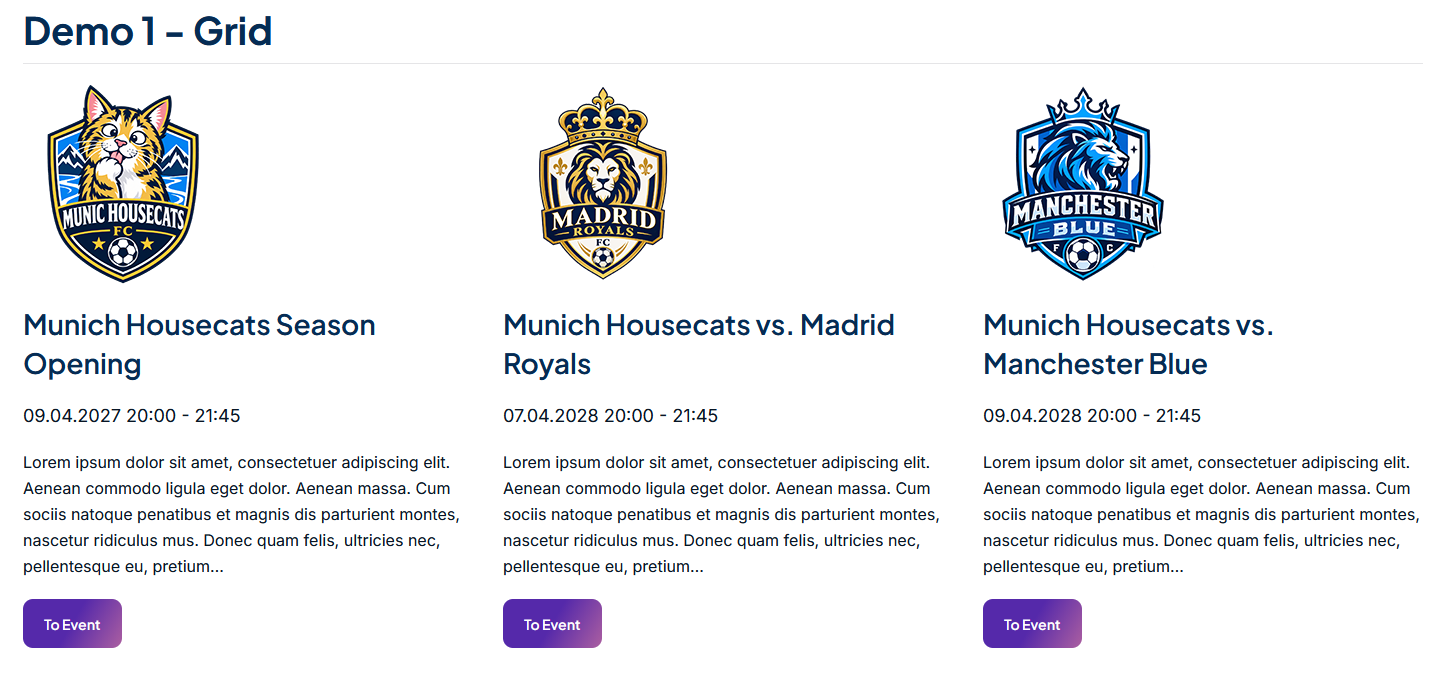
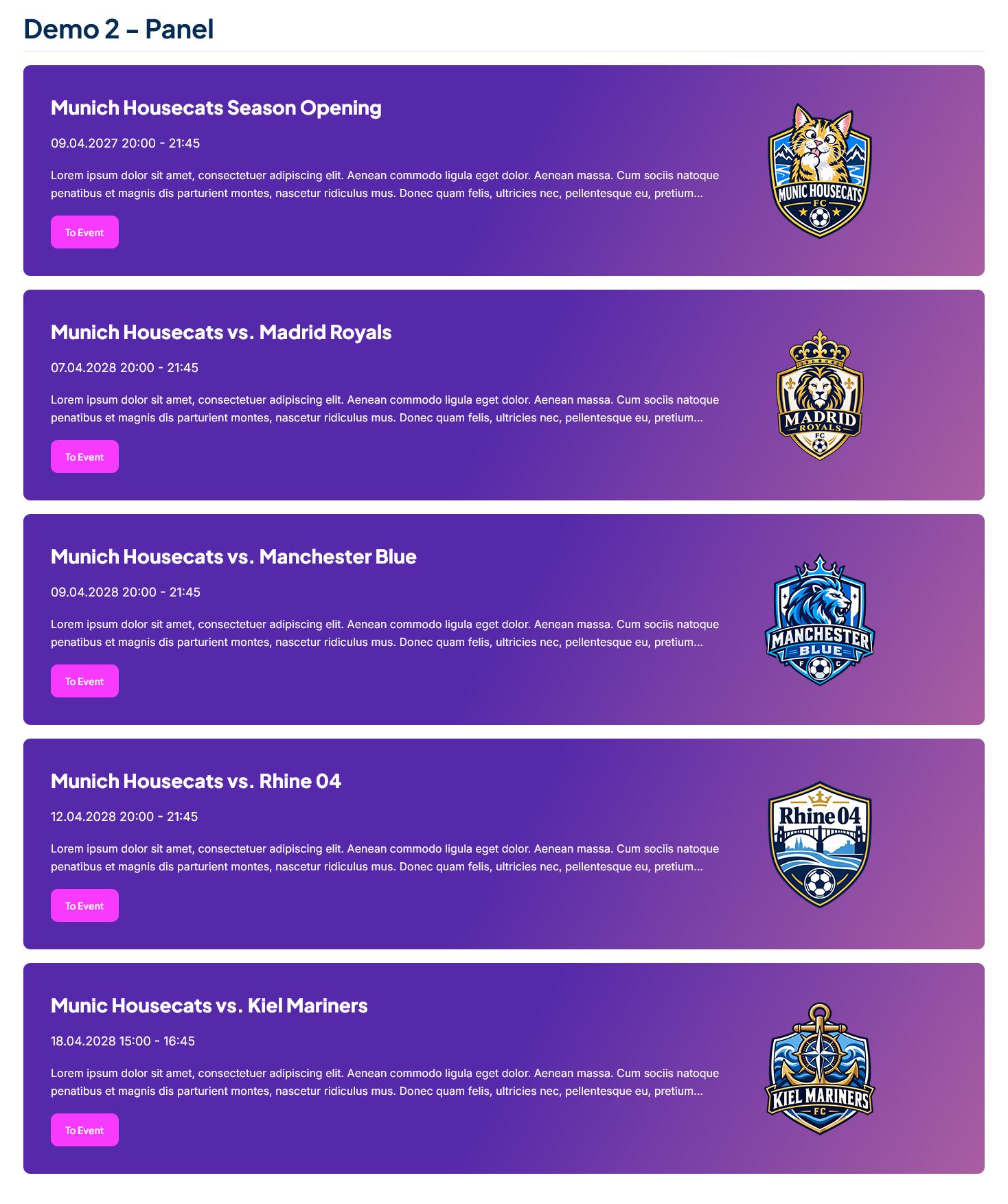




Product Overview
Event Booking Dynamic Content for YOOtheme Pro
Build Dynamic Event Layouts with YOOtheme Pro
A4p Bridge YOOtheme Pro – Event Booking connects the Event Booking component with YOOtheme Pro’s Dynamic Content system.
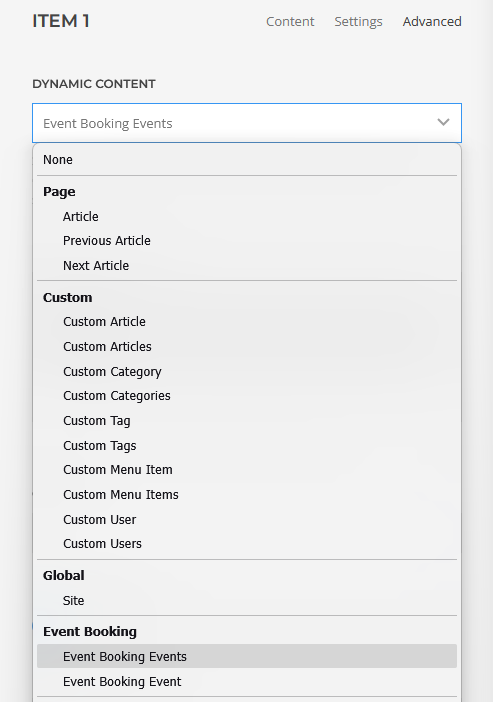
Once installed and enabled, your Event Booking events become available as a dedicated dynamic content source inside YOOtheme Pro. You can use real event data in grids, lists, sliders, cards, landing pages and other layouts created with the builder.
Events continue to be created and managed in Event Booking. The bridge makes that information available to YOOtheme Pro, so you can design the presentation without manually copying event details into separate pages.
One Event Source, Flexible Website Layouts
Create and maintain each event in Event Booking, then use its information wherever it is needed in your YOOtheme Pro layouts.
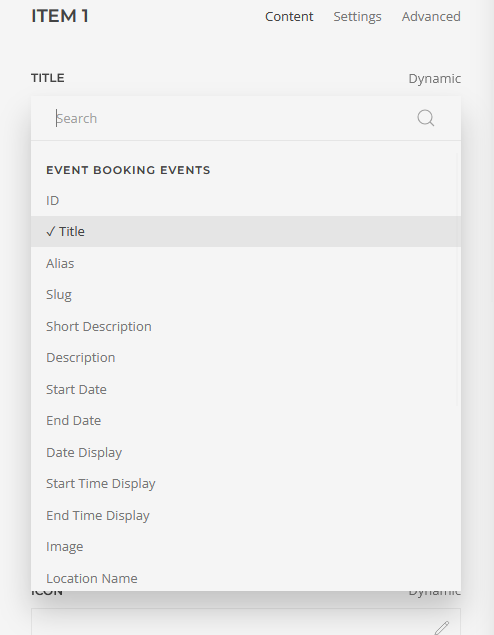
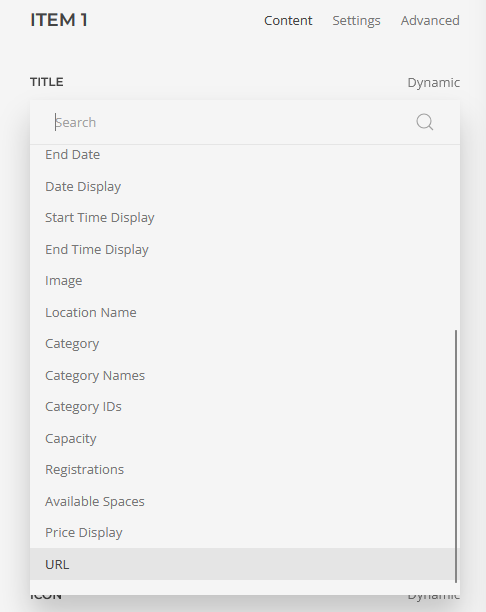
The available dynamic fields include:
- Event title
- Alias and slug
- Short description
- Full description
- Start date
- End date
- Formatted date range
- Formatted start and end times
- Event image
- Location
- Category names and IDs
- Featured status
- Capacity
- Number of registrations
- Available spaces
- Formatted price
- Direct event URL
Text fields support YOOtheme Pro content formatting options, while date fields work with the builder’s native date formatting.
Create Automatically Updated Event Listings
Use the Event Booking Events source to build dynamic event overviews. Listings can be configured by:
- Selecting one or more Event Booking categories
- Defining the number of events to display
- Showing upcoming events only
Events are returned in chronological order. Published state, access level, language and publication dates are respected automatically.
This makes the bridge suitable for:
- Upcoming event overviews
- Seminar and course listings
- Event grids
- Homepage event sections
- Category-specific landing pages
- Training calendars
- Club and association events
- Conference and workshop websites
Create Individual Event Layouts
In addition to event lists, the plugin provides a single-event source. This allows a YOOtheme Pro template or layout to retrieve a specific published event by its Event Booking ID.
You can combine the supplied data with standard YOOtheme Pro elements to create layouts that match the design of your website.
Accurate Dates, Prices and Availability
The bridge prepares Event Booking data for practical use inside YOOtheme Pro.
Event dates and times are handled without an unnecessary second timezone conversion. Date ranges can be displayed using Event Booking’s configured formats or formatted through YOOtheme Pro.
Prices use the Event Booking price text and currency formatting where available. Capacity and registration data are used to calculate the number of remaining spaces.
Designed for Existing Event Booking Workflows
The plugin does not replace Event Booking. Event creation, registration forms, participant management, payments, invoices and booking processes remain handled by the Event Booking component.
The bridge is responsible for presenting Event Booking data through YOOtheme Pro Dynamic Content.
Secure Licensing and Joomla Updates
A valid product licence enables update access through Joomla’s extension update system.
Licence credentials are stored locally in encrypted form. Release downloads use short-lived, single-use authorisation tickets instead of placing long-lived licence credentials in download URLs.
Licence activation and deactivation are managed directly in the Joomla plugin settings.

Frequently Asked Questions

Tags
Key Features
- Dedicated Event Booking dynamic content source for YOOtheme Pro
- Dynamic event lists and individual event sources
- Multiple category selection
- Upcoming-events option
- Configurable number of returned events
- Chronological event ordering
- Event titles, descriptions, dates, images and locations
- Category names and category IDs
- Capacity, registrations and available spaces
- Event Booking-compatible price display
- Direct links to Event Booking event pages
- Native YOOtheme Pro formatting for text and date fields
- Support for multilingual Joomla websites
- Joomla access-level and publishing-rule support
- German and English plugin interface
- Secure licence activation and deactivation
- Automatic licensed updates through Joomla
- No changes to Event Booking core files
Requirements
Official Product Compatibility
- Joomla 6
- YOOtheme Pro 5
- Event Booking for Joomla
- PHP 8.1 or newer
- PHP Sodium extension
- Active addons4.pro licence for automatic updates
YOOtheme Pro and Event Booking are required third-party products and are not included with this plugin.
The current package technically accepts Joomla 5 and Joomla 6 installations. Joomla 6 with YOOtheme Pro 5 is the recommended and officially advertised product configuration.
Installation and Setup
- Install YOOtheme Pro and Event Booking on your Joomla website.
- Install the A4p Bridge YOOtheme Pro – Event Booking package using Joomla’s extension installer.
- Open the plugin settings and activate your licence.
- Make sure the system plugin is enabled.
- Clear the Joomla and YOOtheme Pro caches.
- Open YOOtheme Pro and select Event Booking from the available Dynamic Content sources.
Events remain managed entirely within Event Booking.
Documentation
Changelog
Version 2.0.8
- Final release after successful JED Checker verification.
- Carries forward the JED-compliant system-plugin name and GPL license headers introduced in 2.0.7.
- Updated package and documentation version to 2.0.8.
- No functional changes.
Version 2.0.7
Maintenance and Update Reliability
- Improved the reliability of licence activation and recovery after plugin updates.
- Improved Joomla administrator translations and plugin-setting labels.
- Strengthened the secure update process and download authorisation.
- Preserved existing encrypted licence information during validation and recovery.
- Completed compatibility and delivery checks for the addons4.pro update channel.
- No changes were made to the available Event Booking dynamic content fields.
Version 2.0.1
Secure Update Delivery
- Introduced short-lived, single-use authorisation tickets for plugin downloads.
- Improved protection of persistent update credentials during Joomla updates.
- Connected update requests securely to the correct product, platform and release package.
Version 2.0.0
Licensed Joomla Updates and Modernised Integration
- Added automatic updates through Joomla’s extension update system.
- Added licence activation, validation and deactivation in the plugin settings.
- Added encrypted local storage for licence credentials.
- Improved filtering of events according to Joomla publication state, access level, language and publication dates.
- Improved security and reliability of list and individual-event queries.
- Added German and English licence and plugin interface texts.
- Prepared the bridge for Joomla 4, Joomla 5 and Joomla 6 with PHP 8.1 or newer.
Version 0.5.6
Improved Date and Time Handling
- Added native YOOtheme Pro date formatting for event start and end values.
- Added flexible formatting for event date ranges and times.
- Corrected duplicate timezone conversion that could shift Event Booking times.
- Removed unsuitable text-length controls from date fields.
- Improved compatibility with newer Event Booking and YOOtheme Pro releases.
Version 0.5.1
Event Categories
- Added category names and category IDs as dynamic fields.
- Added category information for use in event layouts.
- Improved compatibility and stability on Joomla 5 and YOOtheme Pro.
Version 0.5.0
First Public Release
- Introduced Event Booking events as Dynamic Content in YOOtheme Pro.
- Added dynamic event lists and individual event sources.
- Added multiple-category selection and upcoming-event filtering.
- Added core fields for titles, descriptions, dates, images, locations, prices, capacity, registrations and available spaces.
- Added direct links to Event Booking event pages.
- Added German and English language support.
Historical Development Milestone
Before the first public release, the initial bridge architecture was created and validated as a development build. This established the connection between Event Booking records and YOOtheme Pro’s Dynamic Content system. No separate public version number is documented for this milestone.

Not Sure If This Extension Fits Your Project?
Related products
-
Joomla Google Reviews Extension – A4p Reviews Lite
19,99 €excl. VAT
Add to cart -
A4p Counter & Statistics PRO for YOOtheme Pro
14,99 €excl. VAT
Add to cart -
A4p Grid Multi Addon for YOOtheme Pro
14,99 €excl. VAT
Add to cart -
J!UM – Joomla Update Manager
59,00 € – 299,00 €excl. VAT
zzgl. Versandkosten
Select options This product has multiple variants. The options may be chosen on the product page