
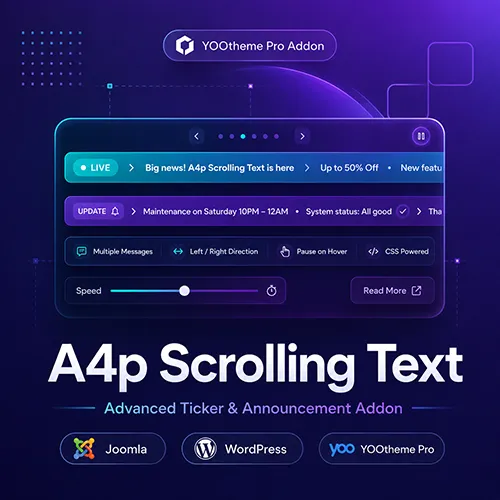

To use this add-on, you need YOOtheme Pro for Joomla or WordPress. YOOtheme Pro is a separate third-party product and is not included with this package.
Moving content can affect readability and accessibility. Use an appropriate speed, concise messages and the optional pause-on-hover feature to give visitors sufficient time to read the content.




Product Overview
Scrolling Text Addon for YOOtheme Pro
The Scrolling Text Addon for YOOtheme Pro adds a flexible ticker element to Joomla and WordPress. Create continuous news tickers, announcements and promotional messages directly inside the familiar YOOtheme Pro Builder.
Use it to display announcements, news headlines, promotional messages or other short pieces of information in a continuous horizontal animation—directly inside the familiar YOOtheme Pro Builder.
The element is suitable for:
- News tickers
- Promotional messages
- Important announcements
- Special offers
- Event information
- Opening hours
- Service notices
- Product updates
- Breaking news
- Website status messages
- Partner or customer names
- Short linked messages
No custom animation code is required.
Create Multiple Scrolling Items with the Editor
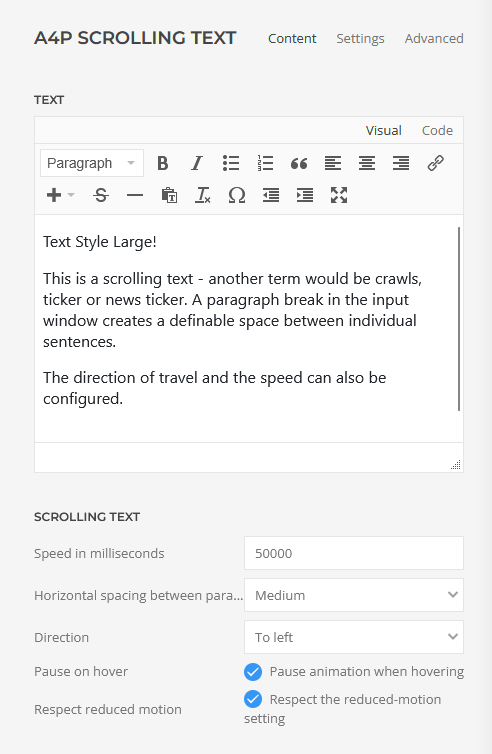
Content is entered through an integrated editor. Each paragraph becomes a separate item within the scrolling sequence.
For example, three editor paragraphs can become:
- Free shipping this week
- New products now available
- Contact us for an individual quote
All items appear in one continuous horizontal ticker. The sequence is repeated automatically to create a smooth loop across the available width.
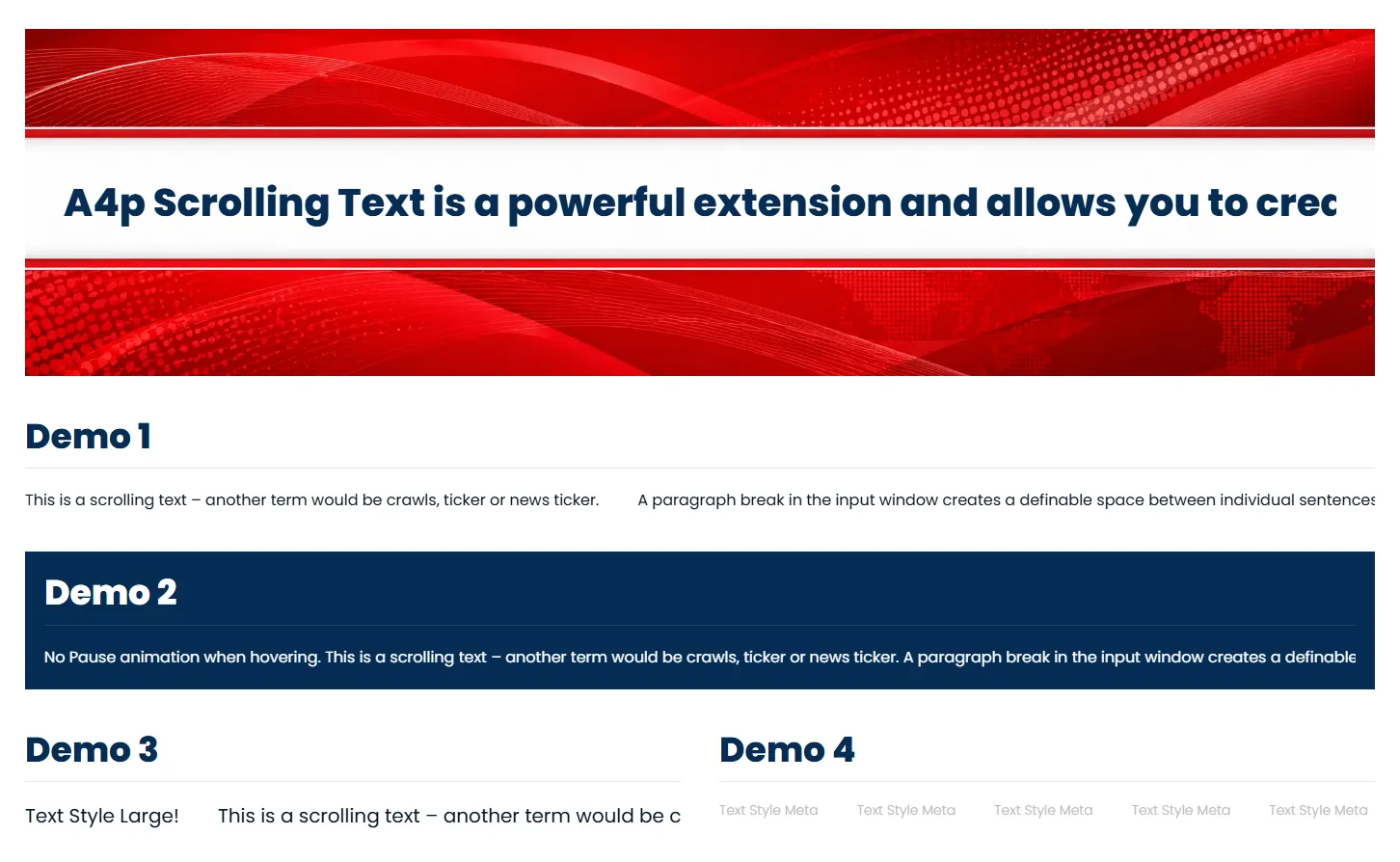
The Joomla and WordPress demos show this approach with multiple individual messages separated by configurable spacing.
Seamless Continuous Animation
The add-on uses a repeated scrolling sequence to reduce visible empty areas and abrupt resets between animation cycles.
Content travels continuously through the viewport and repeats as a single horizontal line. Repeated copies used for the visual loop are hidden from assistive technologies so the same message is not unnecessarily announced several times.
The animation is implemented using CSS and does not require continuous JavaScript width calculations.
Adjustable Scrolling Speed
Control the duration of one scrolling cycle directly in the element settings.
A higher millisecond value produces slower movement, while a lower value creates a faster ticker. This allows the animation to be adapted to the amount and purpose of the content.
Examples include:
- Slow informational announcements
- Moderate promotional messages
- Faster news or event tickers
Always test the selected speed with the actual text and on different screen sizes.
Choose the Scrolling Direction
The text can move in either horizontal direction:
- Scroll to the left
- Scroll to the right
This makes it possible to match the animation to the visual direction and composition of the website.
The setting changes the direction of the animation; it does not automatically translate or rewrite the content.
Configurable Space Between Messages
Choose how much space appears between the individual text items and repeated sequences.
Available spacing options range from no additional space to extra-large spacing and use familiar UIkit spacing values.
Smaller gaps produce a compact news ticker, while larger gaps give promotional messages more visual separation.
Optional Pause on Hover
Enable pause-on-hover to stop the animation when a visitor points at the scrolling text.
This can make messages and links easier to read and select. The option can also be disabled when uninterrupted movement is required.
The live demos show both behaviors:
- A scrolling example that can pause on hover
- A continuously moving example without hover pause
On touch devices, hover behavior depends on the device and browser. Important information should therefore remain understandable without relying exclusively on hover.
Formatted Text and Links
The editor supports selected formatted content, including:
- Links
- Bold and emphasized text
- Small text
- Line breaks
- Spans
- Lists
Unsafe executable link schemes and unsupported markup are removed before output.
The content field also supports YOOtheme Pro Dynamic Content where available, making it possible to connect the ticker to a compatible dynamic source.
YOOtheme Pro Text Styles
Apply the familiar YOOtheme Pro text styles to the complete ticker:
- Meta
- Lead
- Small
- Large
You can also select standard YOOtheme Pro text colors, including muted, emphasis, primary, secondary, success, warning and danger.
The live demos demonstrate both large scrolling text and the more compact Meta style.
Semantic HTML Options
Choose a suitable wrapper element according to the purpose of the ticker:
- Div
- Address
- Aside
- Footer
For a standard promotional ticker, the neutral div element is generally appropriate. Use semantic alternatives only when they correctly describe the purpose of the content.
Standard YOOtheme Pro Layout Controls
Scrolling Text integrates with YOOtheme Pro’s standard element settings, including:
- Position
- Margins
- Maximum width
- Block alignment
- Responsive text alignment
- Visibility
- Entrance animation
- Transform settings
- Custom CSS
- Custom classes, IDs and attributes
This makes it easy to place the ticker in a section, header-style announcement area, footer or other layout region.
Built for Joomla and WordPress
Separate installation packages are provided for Joomla and WordPress. Both versions offer the same principal scrolling options and Builder workflow.
A valid addons4.pro licence enables protected automatic updates through the corresponding platform’s update system.

Frequently Asked Questions

Tags
Key Features
- Dedicated Scrolling Text element for YOOtheme Pro
- Available for Joomla and WordPress
- Continuous horizontal ticker animation
- Multiple messages from separate editor paragraphs
- Seamless repeated scrolling sequence
- Left and right scrolling directions
- Configurable animation speed
- Configurable spacing between messages
- Optional pause on hover
- Formatted text and links
- Dynamic-capable content field
- Meta, Lead, Small and Large text styles
- Multiple YOOtheme Pro text colors
- Semantic wrapper elements
- Responsive alignment and visibility controls
- Standard spacing and positioning options
- Custom CSS and advanced attributes
- CSS-based animation
- No continuous JavaScript width calculation
- Accessible handling of repeated visual sequences
- German and English Builder interface
- Secure content filtering
- Secure licence activation and deactivation
- Licensed automatic updates
- No coding required
Requirements
Joomla
- Joomla 5 or Joomla 6
- YOOtheme Pro
- PHP 8.1 or newer
- PHP Sodium extension for encrypted licence storage
- Modern browser with CSS animation support
- Active addons4.pro licence for automatic updates
WordPress
- WordPress 6.0 or newer
- YOOtheme Pro
- PHP 8.0 or newer
- Modern browser with CSS animation support
- Active addons4.pro licence for automatic updates
Recommended Configuration
- Joomla 6 or a current supported WordPress release
- YOOtheme Pro 5
- HTTPS website
- Short and clearly written ticker messages
YOOtheme Pro is required and is not included with the add-on.
Installation and Setup
Joomla Installation
- Download the product package from your addons4.pro account.
- Unzip the downloaded package on your computer.
- Locate the Joomla installation ZIP file.
- In Joomla, go to System → Install → Extensions.
- Upload and install the Joomla package.
- Go to System → Manage → Plugins.
- Search for A4Pro Scrolling Text.
- Make sure the system plugin is enabled.
- Open the plugin settings and activate your licence.
- Clear the Joomla and YOOtheme Pro caches.
WordPress Installation
- Download and unpack the product package.
- Locate the WordPress installation ZIP file.
- In WordPress, go to Plugins → Add New Plugin → Upload Plugin.
- Upload and install the WordPress package.
- Activate A4Pro Scrolling Text.
- Open the licence settings and activate your licence.
- Clear WordPress, server and YOOtheme Pro caches where applicable.
Creating a Scrolling Ticker
- Open an existing YOOtheme Pro layout or create a new one.
- Click Add Element.
- Select A4p Scrolling Text from the addons4.pro group.
- Enter the first message in the editor.
- Add further messages as separate paragraphs.
- Enter the desired animation duration in milliseconds.
- Select the scrolling direction.
- Choose the spacing between individual messages.
- Enable or disable pause-on-hover.
- Select the text style and color.
- Configure alignment, width and responsive visibility if required.
- Save the layout and test the ticker on desktop and mobile devices.
Recommended Setup
For a clear announcement ticker:
- Use short messages
- Separate individual messages with paragraphs
- Select a medium or large gap
- Use a moderate animation duration
- Enable pause-on-hover
- Avoid placing long paragraphs in the ticker
- Check contrast against the section background
- Test readability on small screens
Documentation
How to install a Joomla or WordPress extension
Installation Guide Joomla
Installation Guide WordPressa
Joomla Live Demo
WordPress Live Demo
The live demos show:
- Multiple scrolling messages
- Paragraph-based item separation
- Adjustable spacing
- Different animation behavior
- Scrolling without pause-on-hover
- Large text styling
- Meta text styling
Changelog
Version 2.1.2 — Joomla and WordPress
JED Compliance and Version Alignment Update
- Improved Joomla Extensions Directory compliance for the Joomla package.
- Added the required GPL license notices to all included Joomla PHP files.
- Added Joomla execution guards to prevent direct access to PHP files.
- Updated the Joomla plugin naming convention to comply with JED requirements.
- Improved internal handling of encrypted license data while maintaining compatibility with existing Joomla installations.
- Removed legacy Base64 encoding patterns flagged by the JED Checker.
- Synchronized the Joomla and WordPress release versions to 2.1.2.
- Updated internal asset version references for consistent cache handling.
- No changes were made to the CSS-only scrolling animation, mobile touch behavior, pause-on-hover handling or reduced-motion support.
- No changes were made to the existing license validation or protected update delivery process.
Version 2.1.1 — Joomla and WordPress
Update Reliability and Security Maintenance
- Improved the WordPress update process so the protected package URL remains available during update detection.
- Ensured license and single-use ticket validation is performed immediately before the package download.
- Retained strict SHA-256 verification of the downloaded WordPress update package before installation.
- Improved error handling for unavailable or unauthorized update packages.
- No changes were made to the visible Scrolling Text presentation or animation features.
Version 2.1.0 — Joomla and WordPress
CSS Loop and Mobile Improvements
- Improved the CSS-only scrolling loop for more precise and seamless continuous animation.
- Equalized the spacing of all repeated scrolling sequences to prevent visible reset offsets.
- Fixed mobile touch behavior so tapping the scrolling text no longer causes the animation to remain paused.
- Added the new “Respect reduced motion” option to control support for the device accessibility setting.
- Improved update security and validation for Joomla and WordPress.
- No JavaScript was added to the scrolling animation.
Version 2.0.5 — Joomla and WordPress
Update Security Hardening
- Added fail-closed SHA-256 verification of the actual downloaded WordPress update package before installation.
- Added a maximum package size check for protected WordPress updates.
- Strengthened validation of secure addons4.pro release URLs and update metadata.
- No changes were made to the visible Scrolling Text features.
Version 2.0.4 — Joomla and WordPress
Mobile and Accessibility Fix
- Fixed an issue where the scrolling animation could remain paused after tapping it on touch devices.
- Restricted “Pause on hover” to devices with a real hover-capable pointer.
- Added the “Respect reduced motion” option for accessibility preferences.
- Improved mobile compatibility on smartphones and tablets.
Version 2.0.3 — Joomla and WordPress
Update Delivery Maintenance
- Completed delivery and compatibility checks for the secure addons4.pro update channel.
- Improved release reliability for licensed Joomla and WordPress installations.
- No changes were made to the visible Scrolling Text features.
Version 2.0.1
More Secure Update Downloads
- Introduced short-lived, single-use authorization tickets for protected downloads.
- Prevented long-lived activation credentials from being included in release requests.
- Improved recovery of WordPress update authorization after plugin upgrades.
- Preserved existing encrypted licence data during update validation.
Version 2.0.0 — Joomla and WordPress
Licensed Automatic Updates
- Added licence activation, validation and deactivation.
- Added automatic updates through dedicated Joomla and WordPress channels.
- Restricted protected downloads to active, non-expired licences.
- Added encrypted local storage for licence credentials.
- Added WordPress automatic-update controls.
- Added package-integrity verification for WordPress updates.
- Added German and English licence administration.
- Improved filtering of editor content and links.
- Strengthened validation of speed, spacing, direction and semantic elements.
- Improved language fallback handling.
- Preserved the existing Scrolling Text element and its settings.
Version 1.1.0 — Joomla and 1.10 — WordPress
Updated Element Icons
- Replaced the main Scrolling Text icon.
- Replaced the smaller Builder icon.
Version 1.0.9
Security and Release Review
- Completed a security and compatibility review of the element.
- Improved safe loading of the element stylesheet.
- Improved sanitization of the Builder preview.
- Verified safe editor output and validation of element settings.
Version 1.0.8
Reliable CSS Animation
- Rebuilt the scrolling animation for reliable output.
- Restored animation in both scrolling directions.
- Improved continuous loop coverage using repeated sequences.
- Corrected animation problems introduced during the preceding development step.
Version 1.0.5–1.0.7
Smoother Continuous Scrolling
- Reworked the ticker into a repeated-sequence loop.
- Reduced visible empty space and abrupt resets between animation cycles.
- Replaced unreliable JavaScript width measurement with CSS-based scrolling.
- Improved spacing between messages and repeated sequences.
- Increased repeated content coverage for a smoother visual loop.
Version 1.0.2–1.0.4
Single-Line Ticker Structure
- Changed editor paragraphs into separate horizontal ticker items.
- Combined all items into one continuous scrolling line.
- Added seamless sequence repetition.
- Made the ticker use the full available width.
- Simplified the settings by removing options that were not relevant to horizontal scrolling.
- Improved spacing consistency and general rendering stability.
Version 1.0.1 — Joomla
First Public Release
- Introduced the Scrolling Text element for YOOtheme Pro.
- Added formatted editor content.
- Added configurable animation speed.
- Added left and right scrolling directions.
- Added spacing options.
- Added pause-on-hover.
- Added German and English Builder translations.
- Added safe handling of formatted content.
Version 1.09 — WordPress
First WordPress Release
- Added the Scrolling Text element for YOOtheme Pro on WordPress.
- Brought the established Joomla feature set to WordPress.
- Added WordPress-compatible content filtering and asset loading.
- Added English and German locale variants.

Not Sure If This Extension Fits Your Project?
Related products
-

Joomla Google Reviews Extension – A4p Reviews Lite
19,99 €excl. VAT
Add to cart -

J!UM – Joomla Update Manager
59,00 € – 299,00 €excl. VAT
zzgl. Versandkosten
Select options This product has multiple variants. The options may be chosen on the product page -

A4p Footer Copyright Addon for YOOtheme Pro
9,99 €excl. VAT
Add to cart -

A4p Counter & Statistics PRO for YOOtheme Pro
14,99 €excl. VAT
Add to cart